A story of wifi secrets, UART lockdowns and a damaged flash memory chip
Dear Fellowlship, just as we announced in our previous post, our beloved God Debugger has seen fit to cast his divine light -laden with opcodes- upon his humble servant, and we have a new homily here in our temple. Please, take a seat and listen to the story of how one of our owls, along with his brother-in-law, moved on to dissect the next component of the Eufy ecosystem: the Eufy HomeBase 2.
Prayers at the foot of the Altar a.k.a. disclaimer
We focused our analysis in Eufy Homebase2 instead of Homebase3 because, as we explained in From your doorbell to your home network it’s the version that I found deployed in my city, and also was the easiest to buy. The firmware version we analyze here is 3.4.2.2h (2026-06-05 18:45:48)
This is the first time I touched something related to “hardware”. I always did vuln hunting on firmwares that I could download from internet, so please forgive the sins I commited
IMPORTANT!!! You must read first the previous article before you continue reading this one.
Table of contents
Just as with the previous article, we will be covering a variety of topics here; consequently, some members of this fellowlship may have no interest in certain sections and might wish to skip straight to whatever appeals to them most. That is why we present this blessed offering: a table of contents.
- 0x00 Firmware extraction. Description of how the firmware was extracted (and how we damaged part of the flash memory).
- 0x01 Identifying the Wifi credential generation algorithm. Reverse Engineering the algorithm used to generate the Wifi credential for OCEAN_XXXXXX management wifi.
- 0x02 Rubber-hose treatment to the UART lockdown. Reflashing a backdoored U-Boot image to get a shell via UART.
- 0x03 Filesystem gardening for debugging purposes. Recovery image is limited so some filesystem quirks are needed in order to run the main binary.
- 0x04 Final Words. I share the lack of enthusiasm for writing articles in the age of AI.
0x00 Firmware extraction
In the previous chapter of this saga, I mentioned that we were only able to extract the doorbell’s firmware because the Homebase’s flash memory was soldered directly to the board and did not expose any pins to which we could attach test hooks to dump the firmware. Initially we did not want to desolder it (although in the end we had to as I will explain later) so I had to wait to acquire additional hardware. Craig S. Blackie pointed me to spring clips that would suit the size needed for the Winbond 25Q256JWEQ (WSON8 8.6mm). Once the clip arrived I created the most makeshift setup imaginable, using rubber bands to secure the clip while I proceeded to take readings using the Raspberry Pi’s SPI0 interface, just as we did with the doorbell.
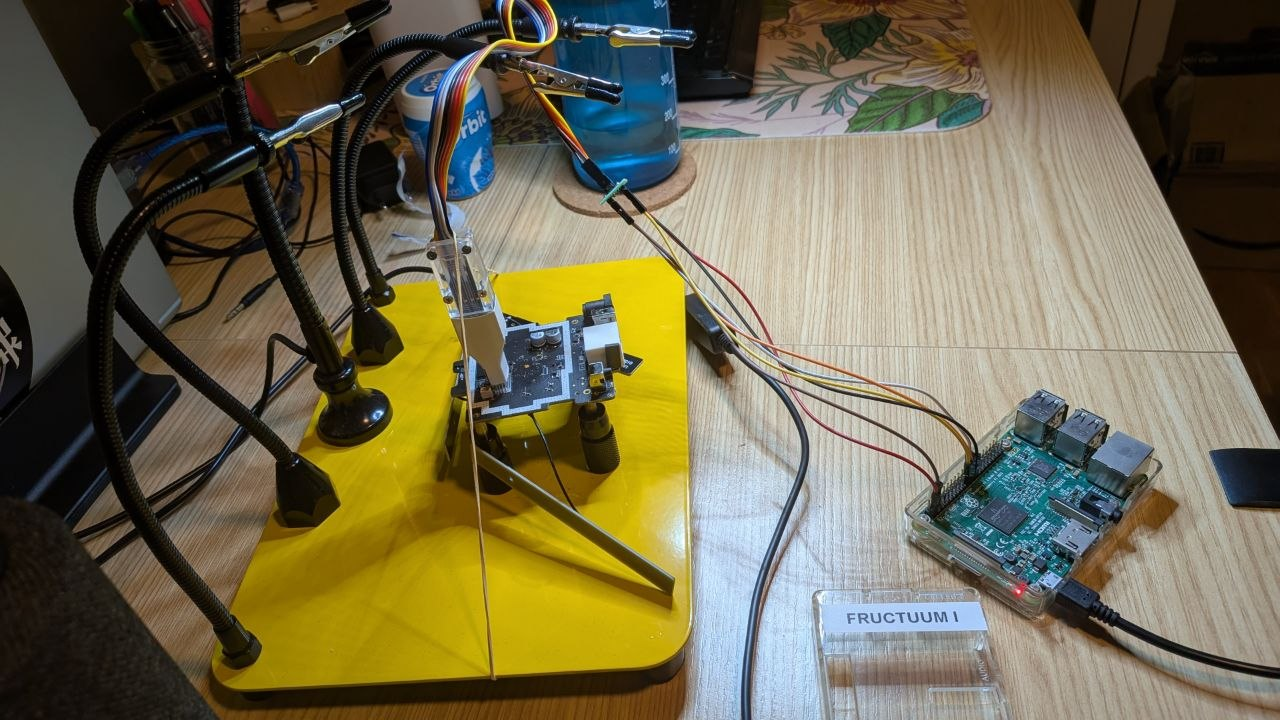
I performed three reads and the three had different checksums, which usually is a indicator of something being wrong. After inspecting the dumps, I quickly realized they were garbage and completely useless. Unlike with the doorbell, in this case, the power supplied for the read operation also activated other components on the board that interacted with the memory; therefore, to extract the firmware, we had to desolder the chip and read it off-board.
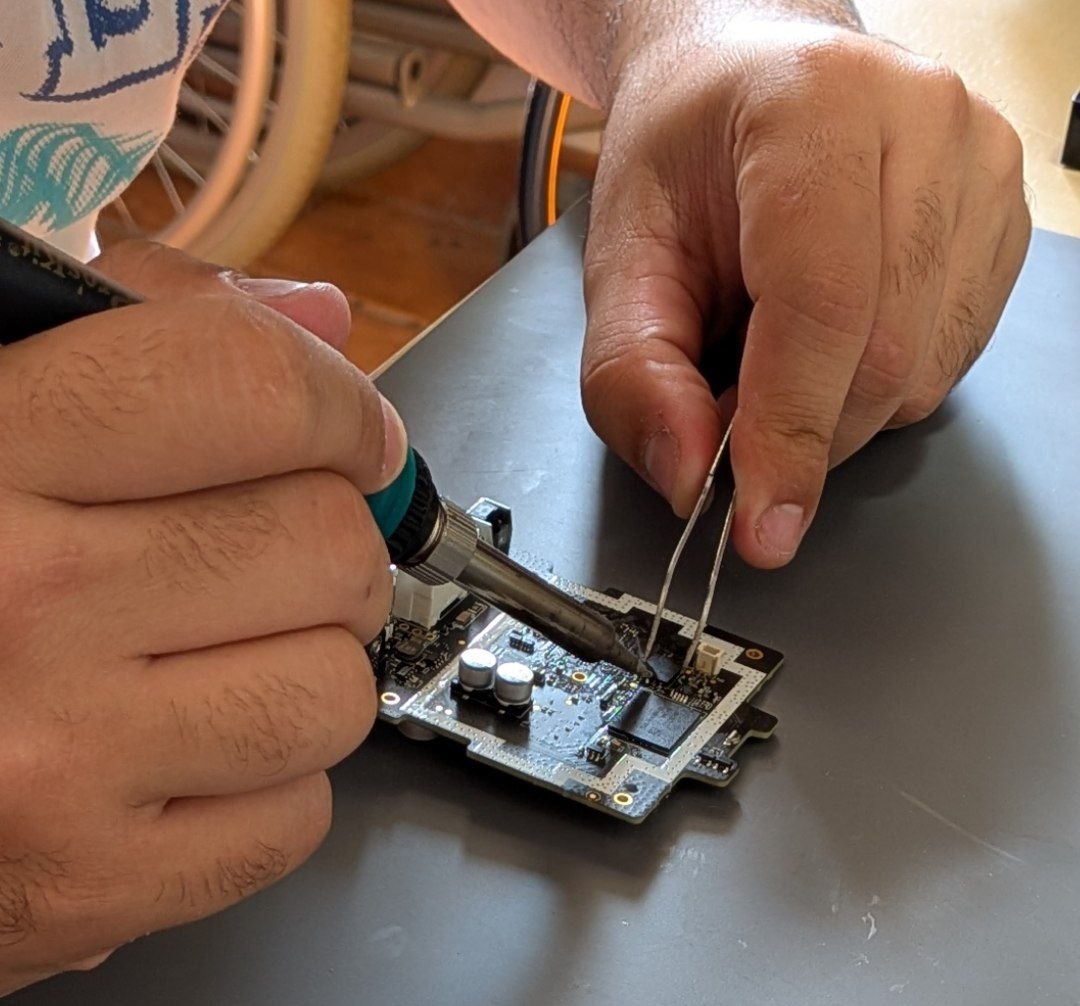
My brother-in-law (Óscar Lestón) was the brave soul that desoldered the flash memory (I was too scared to even try it):
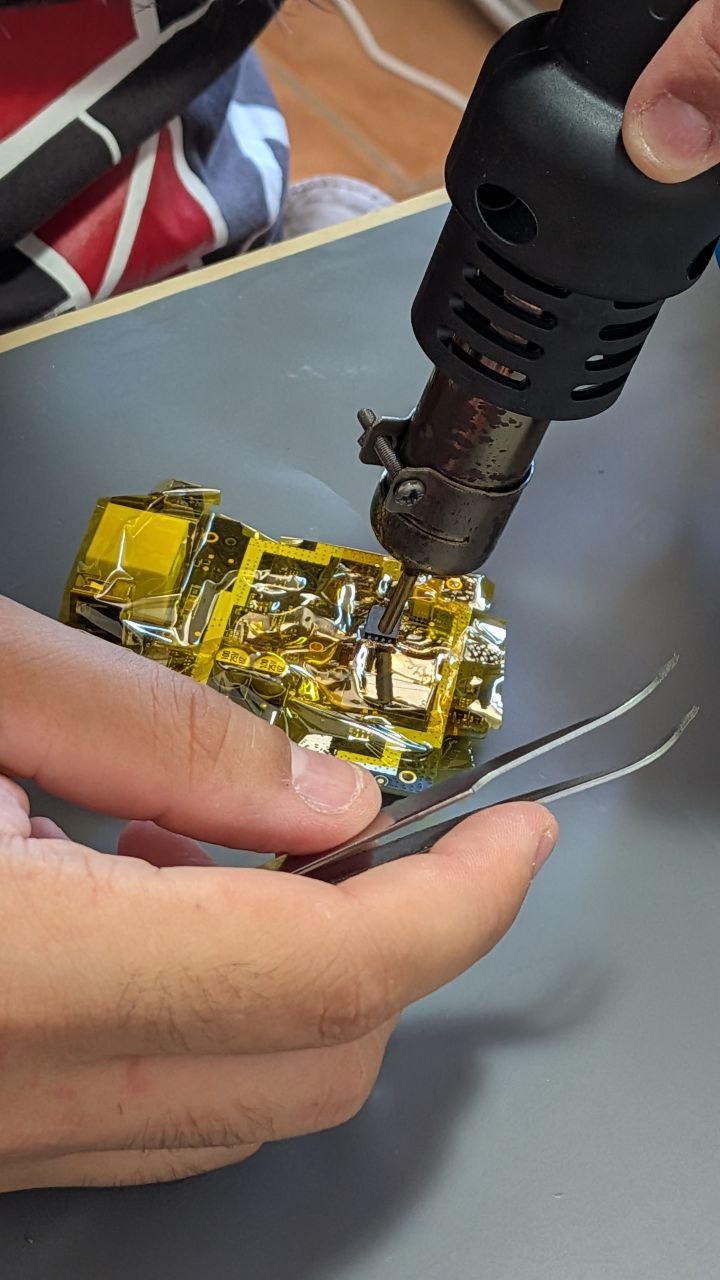
Although the memory module looked terrible once removed, it was barely damaged…
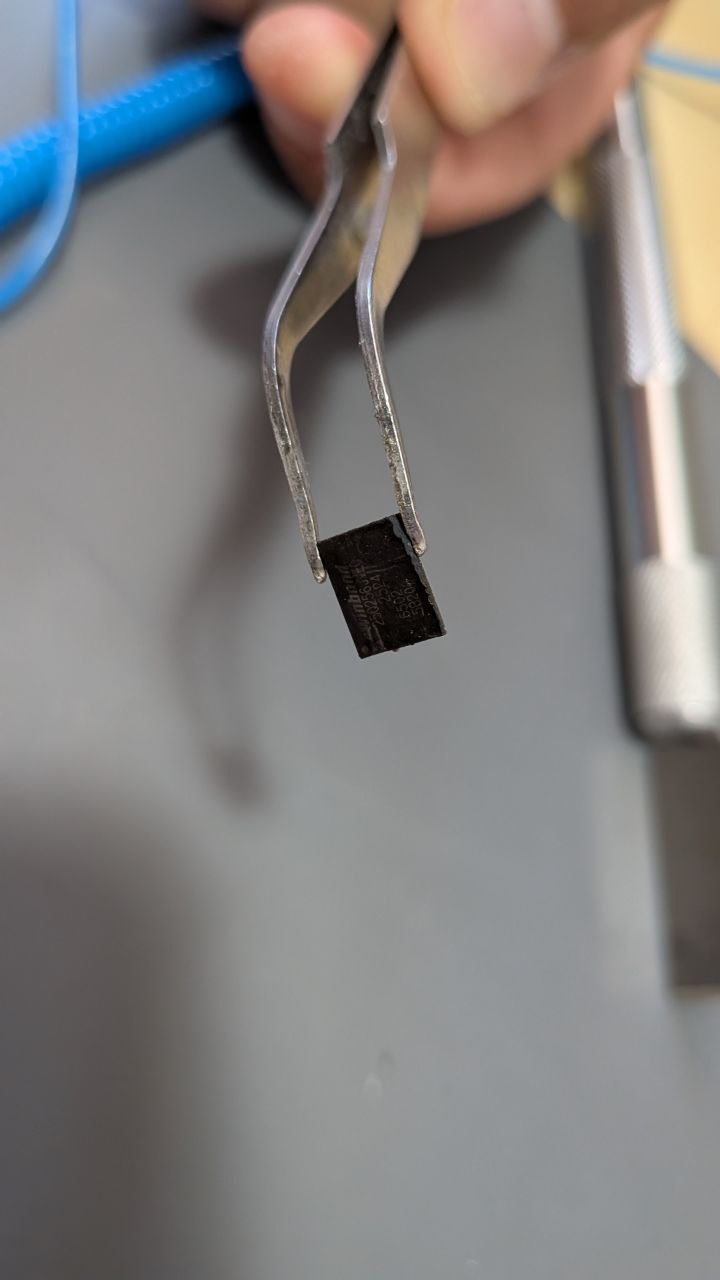
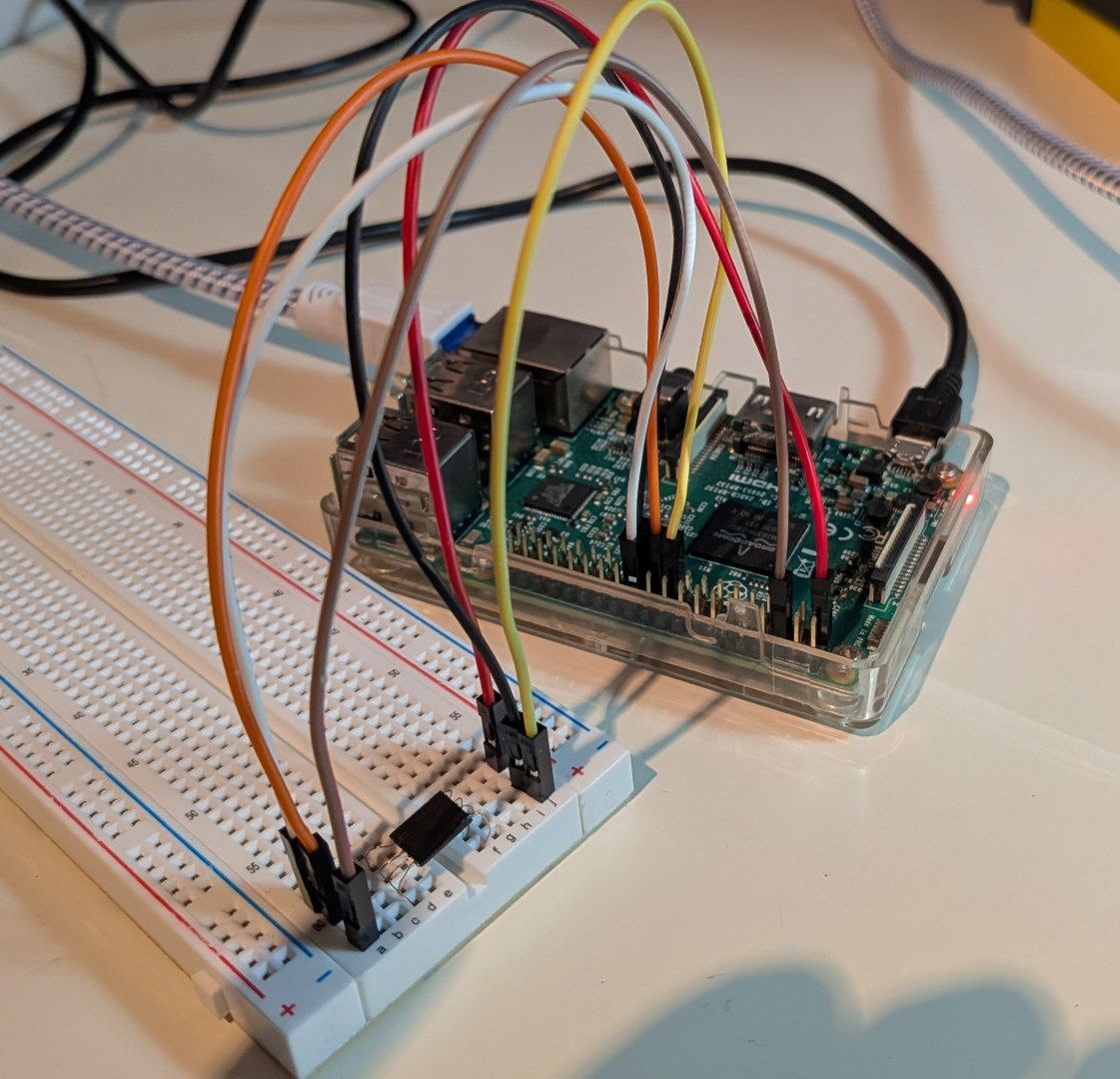
And finally we replicated the same setup using the Raspberry Pi SPI 0 to dump the firmware. This time the three dumps had the same checksum and contained “interesting data”. The only problem was… a block of 64kbs was erased / could not be read, highly probable because we damaged it when extracting the chip.
Most of the firmware could be extracted using Binwalk.
                                                                          /home/psyconauta/research/Eufy/homebase2-firmware/chipoff/STUFF/extractions/homestation2_firmware00.bin
----------------------------------------------------------------------------------------------------------------------------------------------------------------------------------------------------------------------------------------------------------
DECIMAL                            HEXADECIMAL                        DESCRIPTION
----------------------------------------------------------------------------------------------------------------------------------------------------------------------------------------------------------------------------------------------------------
83328                              0x14580                            U-Boot version string: 1.1.3 (Jun 14 2023 - 16:18:56)
3022226                            0x2E1D92                           XZ compressed data, total size: 11514432 bytes
14536660                           0xDDCFD4                           XZ compressed data, total size: 2200 bytes
14538862                           0xDDD86E                           XZ compressed data, total size: 2084 bytes
14540948                           0xDDE094                           XZ compressed data, total size: 1868 bytes
14542818                           0xDDE7E2                           XZ compressed data, total size: 168 bytes
14542988                           0xDDE88C                           XZ compressed data, total size: 4192 bytes
14547182                           0xDDF8EE                           XZ compressed data, total size: 2844 bytes
14550028                           0xDE040C                           XZ compressed data, total size: 244 bytes
14550282                           0xDE050A                           XZ compressed data, total size: 1452 bytes
15138816                           0xE70000                           uImage firmware image, header size: 64 bytes, data size: 3429849 bytes, compression: lzma, CPU: MIPS32, OS: Linux, image type: OS Kernel Image, load address: 0x80000000, entry
                                                                      point: 0x802E04F0, creation time: 2023-06-14 12:56:37, image name: "Linux Kernel Image"
21233664                           0x1440000                          JFFS2 filesystem, little endian, nodes: 3426, total size: 12255244 bytes
Some parts were recovered, others no. Because there was a lot of XS streams, we choose the stupid (or maybe not so stupid) idea of using directly 7z to extract all in a big blob (and hopefully search by needles there to carve files).
➜  extractions mkdir -p 7z_mandanga
➜  extractions 7z e -y -o7z_mandanga homestation2_firmware00.bin

7-Zip 23.01 (x64) : Copyright (c) 1999-2023 Igor Pavlov : 2023-06-20
 64-bit locale=es_ES.UTF-8 Threads:16 OPEN_MAX:1024

Scanning the drive for archives:
1 file, 33554432 bytes (32 MiB)

Extracting archive: homestation2_firmware00.bin

ERRORS:
There are data after the end of archive

--
Path = homestation2_firmware00.bin
Type = xz
ERRORS:
There are data after the end of archive
Offset = 3022226
Physical Size = 11514432
Tail Size = 19017774
Method = LZMA2:17
Streams = 358
Blocks = 358
Characteristics = BlockPackSize BlockUnpackSize

ERROR: There are some data after the end of the payload data : homestation2_firmware00

Sub items Errors: 1

Archives with Errors: 1

Open Errors: 1

Sub items Errors: 1
➜  extractions ls -hal 7z_mandanga
total 42M
drwxrwxr-x 2 psyconauta psyconauta 4,0K sep 19 19:41 .
drwxrwxr-x 4 psyconauta psyconauta 4,0K sep 19 19:34 ..
-rw-rw-r-- 1 psyconauta psyconauta  42M sep 19 18:35 homestation2_firmware00
0x01 Identifying the Wifi credential generation algorithm
One of the key questions we wanted to investigate via the firmware was the new algorithm for generating credentials for the OCEAN_XXXXXX management Wi-Fi, as we observed that it differed completely from what was expected based on the 2024 paper. Specially, we were interesting in know if the algorithm was weak as previously or no.
After writing the previous article, I realized I had failed my brother-in-law as a mentor. I had shown him how to use Ghidra and pseudo-C instead of leading him down the path of light and reason. I atoned for my sin and drew radare2.
First we checked where the Wifi network ESSID and password could be found in the firmware. A simple grep was enough to identify NVRAM variables containing both wifi names and credentials (the ad-hoc wifi used to enroll the doorbell and the mangement wifi):
➜  extractions strings homestation2_firmware00.bin_83358_unknown.raw | grep F1VSXfNQL_ZCd3k -A5 -B5
AuthMode=WPAPSKWPA2PSK;WPAPSKWPA2PSK
EncrypType=AES;AES
RekeyInterval=3600
RekeyMethod=TIME
PMKCachePeriod=10
WPAPSK1=F1VSXfNQL_ZCd3k
WPAPSK2=913ceac3
DefaultKeyID=2;2
Key1Type=0
Key1Str1=
Key2Type=0
➜  extractions strings homestation2_firmware00.bin_83358_unknown.raw | grep OCEAN_E9A5FC -A5 -B5
DDNSPassword=
CountryRegion=0
CountryRegionABand=7
CountryCode=ES
BssidNum=2
SSID1=OCEAN_E9A5FC
SSID2=4350c372
WirelessMode=9
TxRate=0
Channel=0
BasicRate=15
Then we tried a more broad search to try to identify binaries and/or scripts related to the wifi setup:
➜  7z_mandanga strings homestation2_firmware00 | rg 'OCEAN_'
%s,<%d>file not exist.return OCEAN_TEST_TF_CARD_NOT_FOUND.
OCEAN_MAGIC
out of memory of OCEAN_TEST_DATA
OCEAN_TF_CARD_FORMAT_SUCCESSED
OCEAN_TF_CARD_FORMAT_FAIL_MOUNT
OCEAN_TF_CARD_FORMAT_FAIL
OCEAN_TF_CARD_FORMAT_IN_USE
        ssid_prefix="OCEAN_"
        ssid_prefix="OCEAN_"
CONFIG_LEDS_OCEAN_PWM=y
OCEAN_RUN=/mnt/ocean.sh
if [ -f $OCEAN_RUN  ];then
    chmod +x $OCEAN_RUN
    sh $OCEAN_RUN &
Unraveling a bit more this thread we found an interesting line that matches what we already knew: the ESSID is the concatenation of “OCEAN_” and MAC address:
➜  7z_mandanga strings homestation2_firmware00 | rg 'ssid_prefix'
    ssid_prefix="ocean_factory_"
        ssid_prefix="OCEAN_"
    WIFI_SSID=$ssid_prefix$SSID_MAC
    ssid_prefix="`nvram_get ssid_pre`"
    if [ "$ssid_prefix" = "" ];then
        ssid_prefix="OCEAN_"
    WIFI_SSID=$ssid_prefix$SSID_MAC
Let’s zoom out to get the full script:
➜  7z_mandanga strings homestation2_firmware00 | rg 'ssid_prefix' -B30 -A40
.sdata
.sbss
.bss
.pdr
.gnu.attributes
.mdebug.abi32
#!/bin/sh
work_mode="`cat /var/run/testmode`"
def_mode="`nvram_get 2860 work_mode`"
SSID_MAC=""
nvram_ssid="`nvram_get 2860 SSID1`"
bssid_num=`nvram_get 2860 BssidNum`
eth_state=`apcliDaemon get_eth_state`
repeater_enable=`nvram_get 2860 RepeaterEnable`
wifi_11bgn_enabled=`nvram_get 2860 wifi_11bgn_enabled`
Wireless_Mode=9
if [ "$eth_state" = "0" -a "$repeater_enable" = "1" -a "$wifi_11bgn_enabled" = "1" ]; then
    Wireless_Mode=9
get_wifi_mac()
    SSID_MAC="`ifconfig ra0 | grep HWaddr | awk '{print $5}' | awk -F ':' '{print $4$5$6}'`"
    #SSID_MAC="`ifconfig ra0 | grep HWaddr | awk '{print $5}' | awk -F ':' '{print $5$6}'`"
    while [ "$SSID_MAC" = "" ]
        sleep 1
        SSID_MAC="`ifconfig ra0 | grep HWaddr | awk '{print $5}' | awk -F ':' '{print $4$5$6}'`"
        #SSID_MAC="`ifconfig ra0 | grep HWaddr | awk '{print $5}' | awk -F ':' '{print $5$6}'`"
    done
    echo "get mac in ssid is:$SSID_MAC"
if [ "$bssid_num" = "2" ];then
    ifconfig ra1 down>/dev/null 2>&1
if [ "$work_mode" = "1" ];then
    ssid_prefix="ocean_factory_"
    if [ "$def_mode" = "factory_mode" ];then
        ssid_prefix="OCEAN_"
    get_wifi_mac
    WIFI_SSID=$ssid_prefix$SSID_MAC
    echo "set wifi SSID:$WIFI_SSID"
    iwpriv ra0 set SSID="$WIFI_SSID"
    if [ "$def_mode" = "factory_mode" ];then
        # only WIFI_SSID is not equ nvram_ssid, update nvram.
        if [ "$nvram_ssid" != $WIFI_SSID ];then
            nvram_set SSID1 $WIFI_SSID
        fi
else
    ssid_prefix="`nvram_get ssid_pre`"
    if [ "$ssid_prefix" = "" ];then
        ssid_prefix="OCEAN_"
    get_wifi_mac
    WIFI_SSID=$ssid_prefix$SSID_MAC
    echo "set wifi SSID:$WIFI_SSID"
    # only WIFI_SSID is not equ nvram_ssid, update nvram.
    if [ "$nvram_ssid" != $WIFI_SSID ];then
        nvram_set SSID1 $WIFI_SSID
        iwpriv ra0 set SSID="$WIFI_SSID"
        if [ "$nvram_ssid" = "MT7628_AP" ];then
            sleep 3
            #reboot
            /sbin/umount_and_reboot.sh
        fi
    iwpriv ra0 set HtBw=0
    iwpriv ra0 set WirelessMode=$Wireless_Mode
    iwpriv ra0 set HtGi=0
    iwpriv ra0 set SCSEnable=1
    if [ "$bssid_num" = "2" ];then
        # ssid and pwd set in RT2860_default_vlan
        #iwpriv ra1 set SSID="AKDevbind"
        #iwpriv ra1 set WPAPSK="Anker39#*"
        #iwpriv ra1 set SSID="XMCONFIG"
        #iwpriv ra1 set WPAPSK="12345678"
        iwpriv ra1 set HtBw=0
        iwpriv ra1 set WirelessMode=$Wireless_Mode
        iwpriv ra1 set HtGi=0
        iwpriv ra1 set SCSEnable=1
        iwpriv ra1 set WmmCapable=1
        iwpriv ra1 set ed_chk=0
wpapsk="`nvram_get WPAPSK1`"
if [ "$wpapsk" != "" ];then
    #echo "iwpriv ra0 set WPAPSK=$wpapsk"
    iwpriv ra0 set WPAPSK=$wpapsk
# set wmm
iwpriv ra0 set WmmCapable=1
# change wan mode,
wifi
apcli
iwpriv
home_security
if [ "$eth_state" = "0" -a "$repeater_enable" = "1" ]; then
    switch_wan_interface.sh eth2.2 apcli0 0
#!/bin/sh
So, from one side we found how the ESSID is created and from the other side we found that the password is read from a NVRAM variable (wpapsk="nvram_get WPAPSK1"). Let’s do a quick search with that name:
➜  7z_mandanga strings homestation2_firmware00 | rg -i 'WPAPSK1' -A5 -B5
wifi channel:%d.
fail to get freq.
/dev/gpio
Error while opening /dev/gpio
SSID1
WPAPSK1
SSID2
ra1 SSID=%s
WPAPSK2
ra1 WIFI_PWD=%s
/sbin/chpasswd.sh eufycamera %s
--
(...)
Just in the first hit there is something that looks like a compiled binary (that %d is suspicious). I built this crappy script to extract the elf that search for the string, then search backwards to find the magic header and assume the following file in the blob is also an ELF:
 #!/usr/bin/env python3


 with open("homestation2_firmware00", "rb") as file:
     data = file.read()

 needle = data.find(b"WPAPSK1")
 magic = data.rfind(b"\x7fELF", 0, needle)
 end = data.find(b"\x7fELF", needle)
 binary = open("elf_wifi_01", "wb")
 binary.write(data[magic:end])
 binary.close()
And it worked flawelessly:
➜  7z_mandanga python3 carve_wifi.py
➜  7z_mandanga file elf_wifi_01
elf_wifi_01: ELF 32-bit LSB executable, MIPS, MIPS32 rel2 version 1 (SYSV), dynamically linked, interpreter /lib/ld-uClibc.so.0, stripped
Doing a quick check on the symbols we find a lot of interesting stuff related to wifi, specially that juicy set_wifi_pwd.
➜  7z_mandanga r2 elf_wifi_01
WARN: Relocs has not been applied. Please use `-e bin.relocs.apply=true` or `-e bin.cache=true` next time
 -- Use 'zoom.byte=printable' in zoom mode ('z' in Visual mode) to find strings
[0x0045d130]> aaa
INFO: Analyze all flags starting with sym. and entry0 (aa)
INFO: Analyze imports (af@@@i)
INFO: Analyze entrypoint (af@ entry0)
INFO: Analyze symbols (af@@@s)
INFO: Running plugin pre-analysis hooks
INFO: Analyze all functions arguments/locals (afva@@F)
INFO: Analyze function calls (aac)
INFO: Analyze len bytes of instructions for references (aar)
INFO: Finding and parsing C++ vtables (avrr)
INFO: Analyzing methods (af @@ method.*)
INFO: Emulate functions to find computed references (aaef)
INFO: Recovering local variables (afva@@@F)
INFO: Type matching analysis for all functions (aaft)
INFO: Propagate noreturn information (aanr)
INFO: Use -AA or aaaa to perform additional experimental analysis
INFO: Finding xrefs in noncode sections (e anal.in=io.maps.x; aav)
[0x0045d130]> afl~wifi
0x006f8908    1    288 sym.eufy_setDoorbellMechanicalChimeSwitch_wifi
0x005a972c   14   1124 sym.zx_update_dev_wifi_info_by_addr
0x0054ad3c   10    316 sym.check_hub_wifi_power
0x00558fd8   18   1800 sym.quick_bind_wifi_mgmt_rcv_handler
0x0052cfac   19   1272 sym.zx_update_hub_wifi_channel
0x005e5414   93   7544 sym.netlink_wifi_connect
0x0093f1c0    6    528 sym.aws_wifi_get_mac
0x0053aff8    1     80 sym.zx_get_wifi_mac
0x004cda10   13    728 sym.zx_check_wifi_version
0x005489a0    1     16 sym.wifi_reduceTxPower
0x005a47a0   23    892 sym.zx_alloc_wifi_addr
0x00532224    4    324 sym.set_camera_wifi_rssi
0x0049c7d4   11    448 sym.wifi_check_all_devs_online
0x0049c61c   10    440 sym.wifi_get_dev_rssi
0x0049c994   20   1768 sym.wifi_get_devs_rssi_list_in_json
0x0059e8f8    3    204 sym.restart_wifi
0x0053bb04    1    144 sym.set_pair_wifi_info
0x0053b048    8    660 sym.get_wifi_info
0x006fb684  399  18808 sym.zx_wifi_send_command
0x00603514    6    484 sym.make_wifi_notify_json
0x0054ab0c    9    560 sym.convert_wifi_countrycode
0x0059df7c    1    104 sym.wifi_info_signal_init
0x0053b510   33   1524 sym.set_wifi_pwd
0x00558894    5    292 sym.zx_quick_bind_timer_stop_send_wifi_info
0x006f8094    8    304 sym.eufy_set_wifi_countrycode
0x0054ae78    7    464 sym.set_wifi_power_flag
0x004da374   54   3076 sym.zx_handle_wifi_ready
0x006f6348    8    828 sym.wifi_log_server_init
0x006f8a28    1    288 sym.eufy_setDoorbellElectronicRingtoneTime_wifi
0x0094a1f4    4    168 sym.anker_mgmt_register_get_wifi_channel_cb
0x00532368   10    396 sym.check_camera_wifi_rssi_ok
0x005580a0   28   2036 sym.zx_quick_bind_timer_send_wifi_info
0x0094a29c    4    168 sym.anker_mgmt_register_get_wifi_mac_cb
0x0053b2dc    6    564 sym.get_wifi_ra1_info
0x006f6684    8    828 sym.wifi_log_server_t40_init
0x0056dc34   15   1008 sym.repeater_update_all_dev_wifi_channel
0x0049d07c   13    636 sym.wifi_devs_rssi_test_mode_exit
0x004daf78    1    160 sym.handle_wifi_ready_thread
0x008c5ac4    7    356 sym.zx_homekit_get_wifi_ready
0x0049d2f8    9    288 sym.wifi_setManualChannel
0x004cd584   11    668 sym.eufysdk_common_msg_wifi_callback
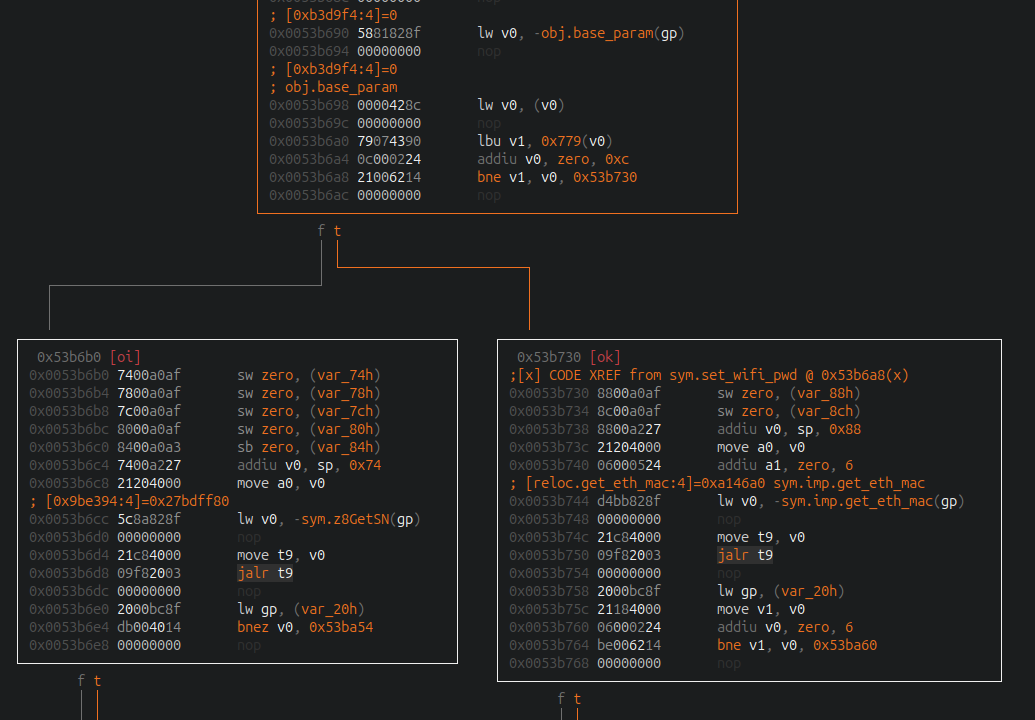
Jumping into that function we can see that first it builds a password based on a MD5 hash that is used locally for the user eufycamera and it’s not related to the wifi. The wifi-stuff starts at 0x0053b690 where it checks one parameter from base_param (I guess the type of device or model) against 0x0C. This part is key because if the value is different to 0x0C, then it uses the MAC Address (right block) meanwhile if it matches then it would use what returns z8GetSN() (left block). We are in the z8GetSN() case.
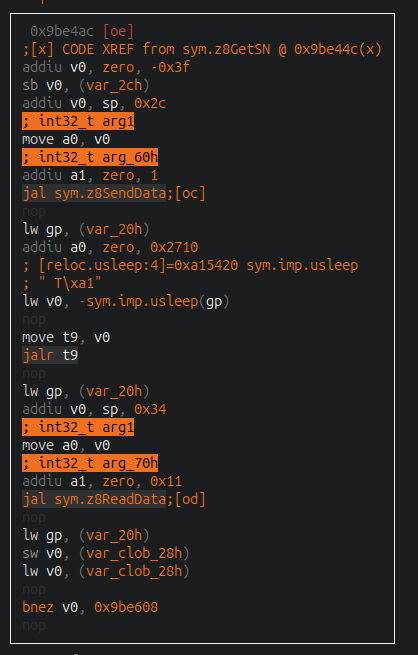
The z8GetSN() function communicates through i2c and sends command 0xC1 (the i2c part is inside z8SendData()) and read 0x11 bytes from the response.
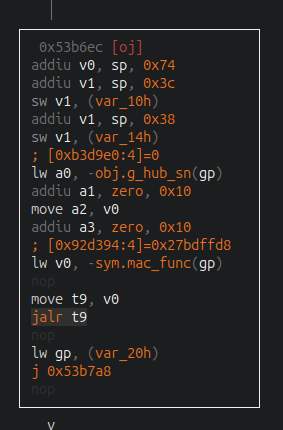
Then bytes are translated into 32 byte string and fed to a function called mac_func() which also receives the Homebase Serial Number (T8010...):
This mac_func calls a helper to perform HMAC SHA256 with the previous mentioned data, being the “message” the value returned by z8GetSN and the “key” the Serial Number:
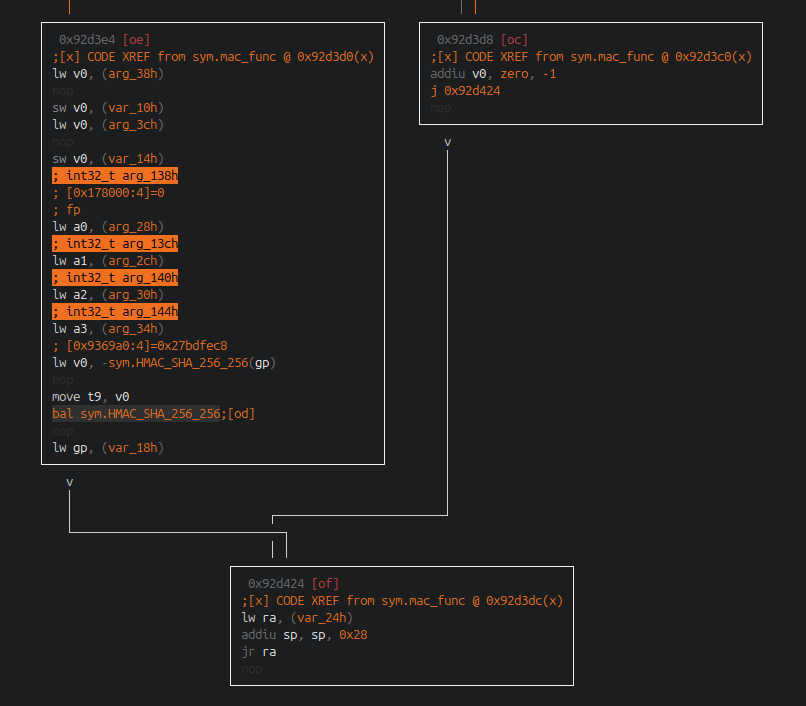
The result is used by a function that would encode the information into text.
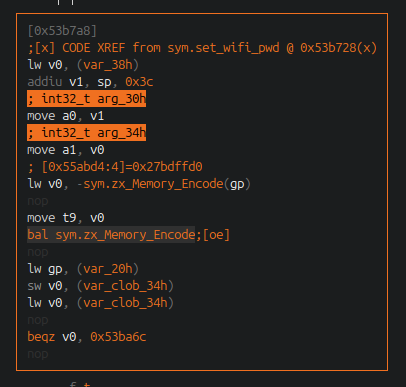
The zx_Memory_Encode function calls urlsafe_b64_encode which converts the value into base64 using the following alphabet:
[0x006f0490]> px 65 @ 0xa5cb40
- offset -  4041 4243 4445 4647 4849 4A4B 4C4D 4E4F  0123456789ABCDEF
0x00a5cb40  4142 4344 4546 4748 494a 4b4c 4d4e 4f50  ABCDEFGHIJKLMNOP
0x00a5cb50  5152 5354 5556 5758 595a 6162 6364 6566  QRSTUVWXYZabcdef
0x00a5cb60  6768 696a 6b6c 6d6e 6f70 7172 7374 7576  ghijklmnopqrstuv
0x00a5cb70  7778 797a 3031 3233 3435 3637 3839 2d5f  wxyz0123456789-_
0x00a5cb80  00                                       .
Finally, the password is updated in NVRAM and changed executing the external command iwpriv ra0 set WPAPSK=%s:
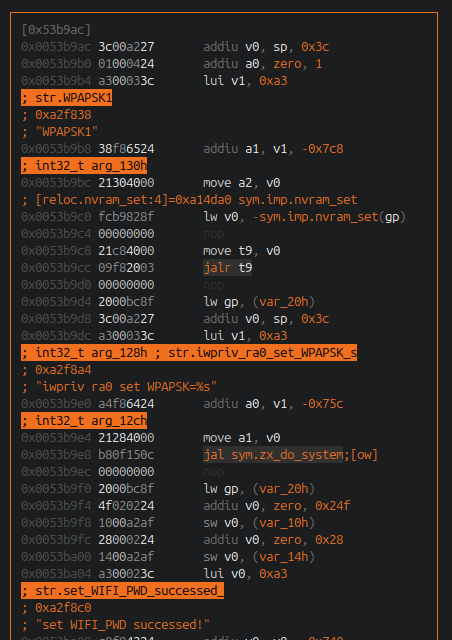
So, the only unkown data to replicate the password is the value returned by z8GetSN. The other compontent, the device serial number, is “predictable” because it follows a known template based on the type of device.
0x02 Rubber-hose treatment to the UART lockdown
In the previous article, we mentioned that UART access was blocked. Specifically, connecting via UART yielded a prompt asking the user to press the “Enter” key. However, doing so caused the process to terminate and the same program to relaunch, once again requesting the key press; this created an infinite loop that prevented access to an actual shell. Logs can be seen below:
starting pid 5617, tty '/dev/ttyS1': '/sbin/login.sh'

process '/sbin/login.sh' (pid 5617) exited. Scheduling for restart.

Please press Enter to activate this console.
setrlimit(RLIMIT_CORE, &limit);

starting pid 6526, tty '/dev/ttyS1': '/sbin/login.sh'

process '/sbin/login.sh' (pid 6526) exited. Scheduling for restart.

Please press Enter to activate this console.
setrlimit(RLIMIT_CORE, &limit);

starting pid 6608, tty '/dev/ttyS1': '/sbin/login.sh'


process '/sbin/login.sh' (pid 6608) exited. Scheduling for restart.
On the other hand, trying to interrupt U-Boot witch a escape sequence did not work.
After acquiring the firmware and resolving questions about how the Wi-Fi password algorithm worked, the next objective was to understand the mechanism behind the UART access lockout and find a way to bypass it, as we intended to use the device itself to debug key services and search for vulnerabilities.
In the logs the serial port is /dev/ttyS1, so let’s search references to it:
➜  extractions grep -r ttyS1
grep: homestation2_firmware00.bin.extracted/E70000/Linux_Kernel_Image.bin.extracted/0/decompressed.bin: coincidencia en fichero binario
grep: homestation2_firmware00.bin.extracted/E70000/Linux_Kernel_Image.bin.extracted/0/decompressed.bin_3143840_aes_forward_table.raw: coincidencia en fichero binario
grep: homestation2_firmware00.bin.extracted/E70000/Linux_Kernel_Image.bin.extracted/0/decompressed.bin_3679760_unknown.raw: coincidencia en fichero binario
grep: homestation2_firmware00.bin.extracted/E70000/Linux_Kernel_Image.bin.extracted/0/decompressed.bin_3135648_aes_reverse_table.raw: coincidencia en fichero binario
grep: homestation2_firmware00.bin.extracted/E70000/Linux_Kernel_Image.bin.extracted/0/decompressed.bin.extracted/3F16A4/decompressed.bin: coincidencia en fichero binario
homestation2_firmware00.bin.extracted/E70000/Linux_Kernel_Image.bin.extracted/0/decompressed.bin.extracted/3F16A4/decompressed.bin.extracted/0/etc_ro/inittab:ttyS1::askfirst:/sbin/login.sh
grep: homestation2_firmware00.bin.extracted/E70000/Linux_Kernel_Image.bin.extracted/0/decompressed.bin.extracted/3F16A4/decompressed.bin.extracted/0/bin/recover_0_elf.raw: coincidencia en fichero binario
grep: homestation2_firmware00.bin.extracted/E70000/Linux_Kernel_Image.bin.extracted/0/decompressed.bin.extracted/3F16A4/decompressed.bin.extracted/0/bin/recover: coincidencia en fichero binario
homestation2_firmware00.bin.extracted/E70000/Linux_Kernel_Image.bin.extracted/0/decompressed.bin.extracted/3F16A4/decompressed.bin.extracted/0/sbin/makedevlinks.sh:mknod /dev/ttyS1 c 4 65
grep: homestation2_firmware00.bin.extracted/E70000/Linux_Kernel_Image.bin.extracted/0/decompressed.bin.extracted/3F16A4/decompressed.bin_0_cpio.raw: coincidencia en fichero binario
grep: homestation2_firmware00.bin.extracted/E70000/Linux_Kernel_Image.bin.extracted/0/decompressed.bin_3147936_aes_rcon.raw: coincidencia en fichero binario
grep: 7z_mandanga/homestation2_firmware00: coincidencia en fichero binario
The key is in the inittab file, where we can see the it triggers the execution of /sbin/login.sh script once the user press “Enter” (the BusyBox askfirst action shows the prompt with sentence “Please press Enter to activate this console”). The script is simple as:
#!/bin/sh

DEBUG_LOG="`nvram_get debug_log`"
if [ "$DEBUG_LOG" = "1" -o -f "/mnt/enable_console" ];then
	echo "enter debug mode" > /dev/console
	/bin/login
fi
The script checks if debug mode is enabled by checking the NVRAM variable debug_log and based on that allows the access to the shell (well, to login in the shell) or exits, entering in the loop.
We did not find a straight way to enable that variable and bypass the lockdown. There are various ways on changing the boot mode to enable “debug”, but all of them are far away from our hands because:
- One of them is based in the presence of a file in the filesystem. Because to be able to drop a file we would need access, it is a chicken-egg situation.
- The other method involves a convoluted magic protocol based on ARP and commands signed by a private key which is not present in the firmware. Yes, they use encapsulate their own protocol on ARP and exchange magic signed packets to enable debug remotely. I am not sure what crack they smoked.
It occurs to me at this point that if we can not bypass the check for whether it is booting in production or debug mode, why not completely obliterate the check and jump straight to a shell?
The firmware did not contain anything encrypted, so should be straight forward to modify it to allow us direct access through the serial port. The problem was… Do you remember when I mentioned that it was “barely damaged”?. Well, we fucked 64kbs at 0x500000 which is the load address for the image.
At first, I thought our clumsy hands had ruined the project and that the idea of using the actual device for dynamic analysis with a debugger was slipping away (we would still have the option of trying to emulate some binaries, but having access to the original hardware is always infinitely easier). Fortunately, after analyzing the firmware layout a bit more, we discovered a much smaller “recovery image” that was still intact at 0xe70000. So, because the “normal” image was fucked, the bootloader would have to load this recovery image that we can manipulate to remove the UART lockdown.
The “recovery image” is a U-Boot image with a 64-byte header:
| Header offset | Length | Field | Original recovery value |
|---|---|---|---|
0x00 | 4 | Magic | 0x27051956 |
0x04 | 4 | Header CRC32 | 0xe764e161 |
0x08 | 4 | Timestamp | Preserved by the builder |
0x0c | 4 | Compressed payload length | 0x3455d9 = 3,429,849 |
0x10 | 4 | RAM load address | 0x80000000 |
0x14 | 4 | Entry address | 0x802e04f0 |
0x18 | 4 | Payload CRC32 | 0x19b650c3 |
0x1c | 4 | OS, architecture, type, compression | 05 05 02 03 |
0x20 | 32 | Image-name area | Preserved, including vendor-used bytes |
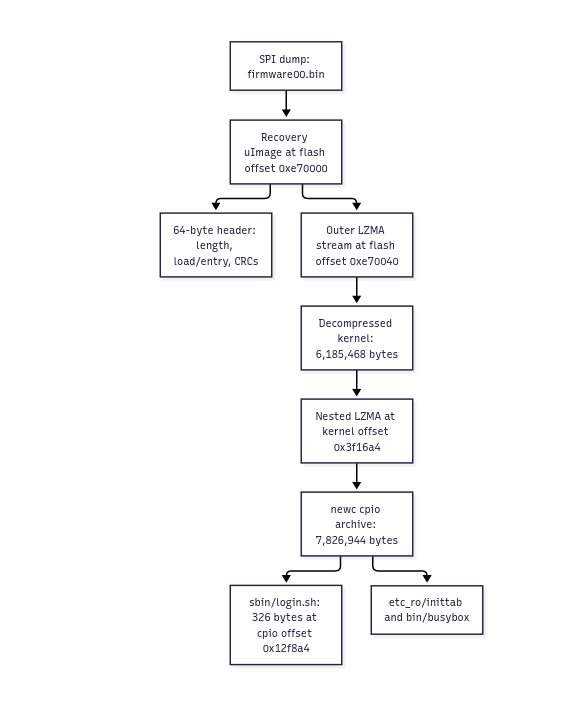
The actual filesystem is inside a matrioska of different compression layers that can be visualized in the following diagram:
Once the filesystem was unpacked, I made the minimal changes to allow us to jump directly to the shell with root privileges. To avoid headaches, I padded the modifications to match the same size it had the original code (code is from python script I used to perform the modifications and re-pack/fix CRCs):
old_condition = b'if [ "$DEBUG_LOG" = "1" ];then'
new_condition = b'if [ 1 = 1 ];then' + b' ' * 13

old_login = b'\t/bin/login\n'
new_login = b'\t/bin/sh   \n'
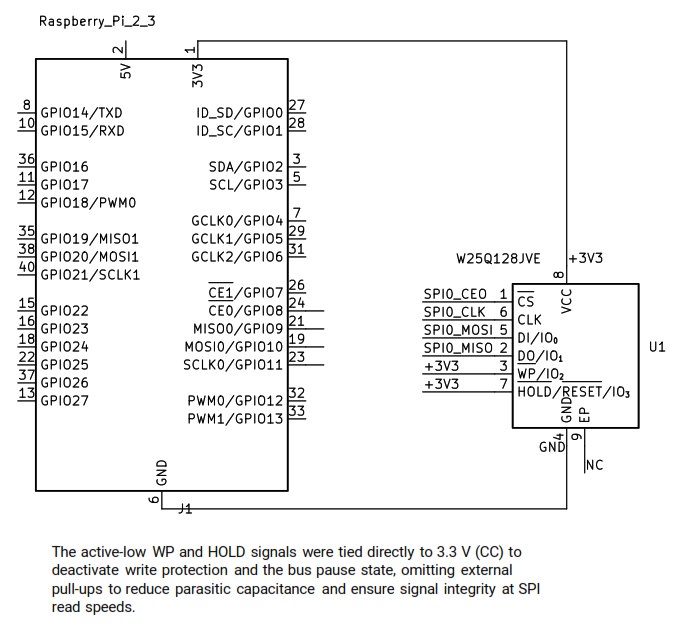
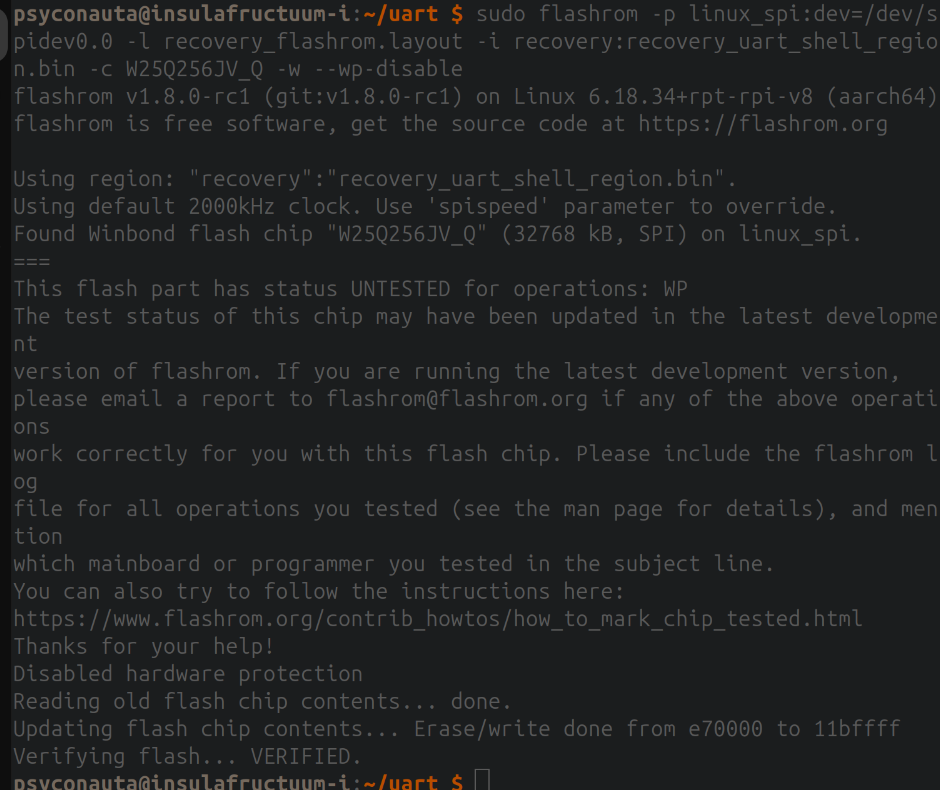
After doing some local test to verify that the modified recovery image was correctly modified and it would unpack/load correctly we proceeded to overwrite it in the flash chip. In order to disable the Write Protection that appears in the documentation this connection diagram was followed:
Writing the new recovery image:
Then we performed three reads to verify the process was done correctly. After that, the chip was solded again into the device board:
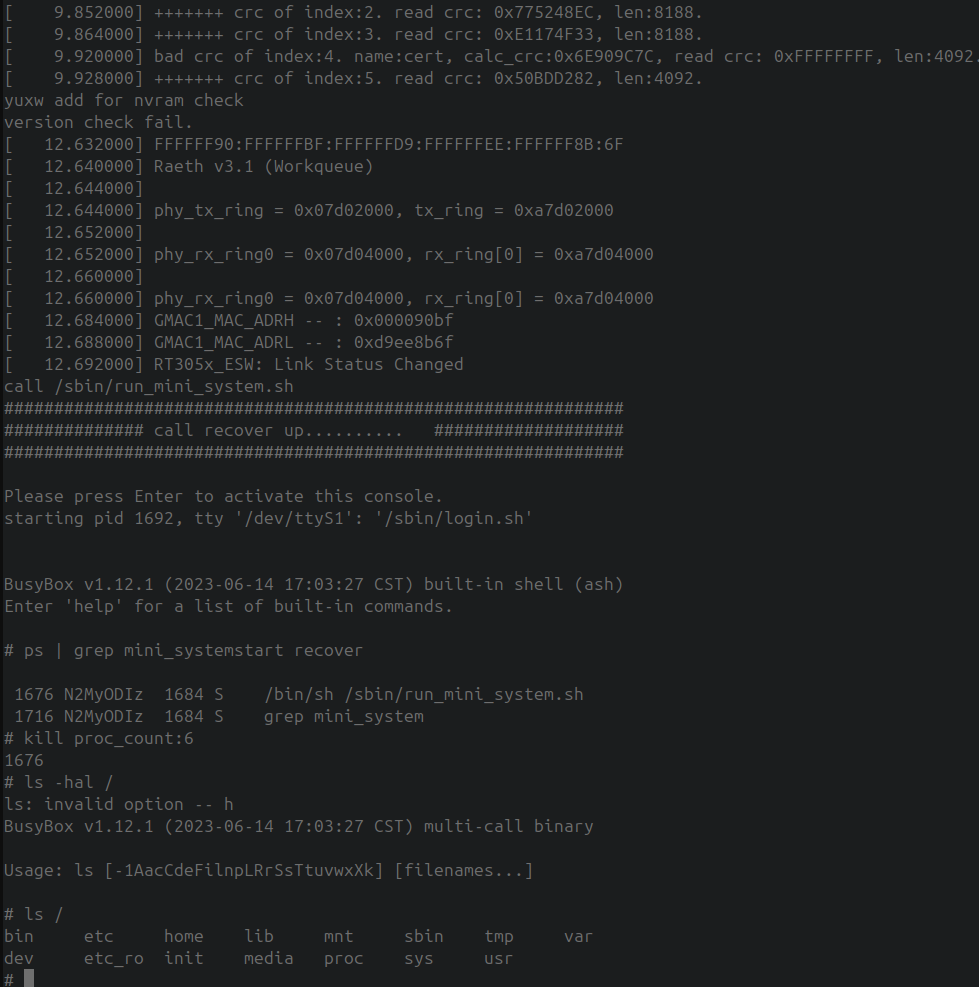
Once the chip was soldered I connected again my laptop to the device using a USB-TTL. First it tried to load the normal image, but it failed and then it jumped to backdoored recovery image and after loading it… we got a shell!!
0x03 Filesystem gardening for debugging purposes
We finally have a shell; the only problem is that the recovery image is very limited and the file system is not mounted, so the binaries and libraries needed to properly debug the system are missing. Furthermore, the kernel lacks certain modules-such as those responsible for handling WiFi interfaces or the I2C interface used to generate the WiFi key.
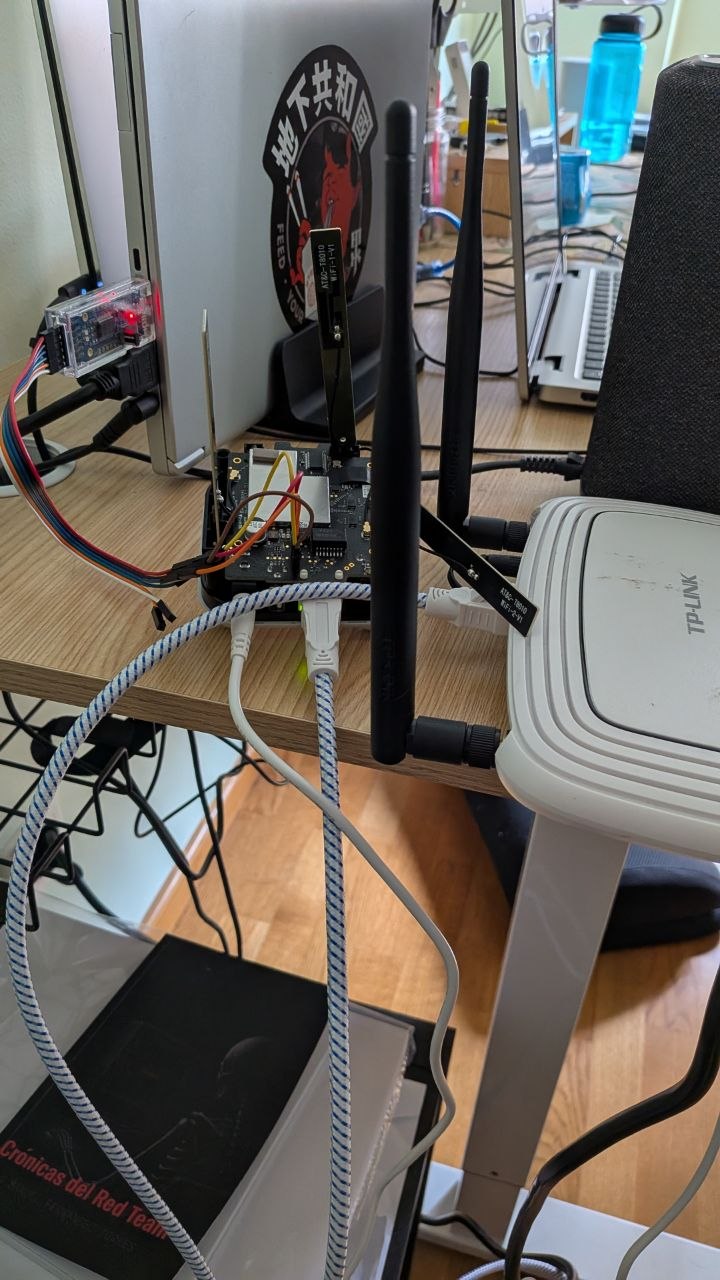
The set of commands available in the default image is quite limited, but at least there are tools like wget, which allows us to transfer files from the laptop to the device. I prepared a crappy setup using an old TP-Link router that I got from Telefónica in 2015.
I compiled a new BusyBox with loads of extra commands that were not present in the original one. Using this new BusyBox I started to try to create a “staged” filesystem and bind all the paths to this “staged” filesystem. I had to execute services needed to run before the big ELF in charge of main services (homeapp_security, the same binary that contained the WiFi logic), also because of memory limitations I had to modify some kernel parameters like overcommit_ratio. It was a three hours process of hit and miss until I could run the main binary and be able to interact with it.
Because this was a process that I would need to repeat each time I wanted to use the device (because the filesystem in the recovery image is not persistent, so after each boot I have to restore all) I shared the logs of picocom to Codex and asked it to prepare a all-in-one script that would repeat the same steps I did (and discard the stuff that didn’t work). To be honest, the following morning after that night of playing with the Homebase I barely remembered what I did, so having the logs was marvelous to rebuild and automatize the process. Keep logs of everything always, they will save your ass at some point.
The diagram of actions until the homeapp_security runs is the following:
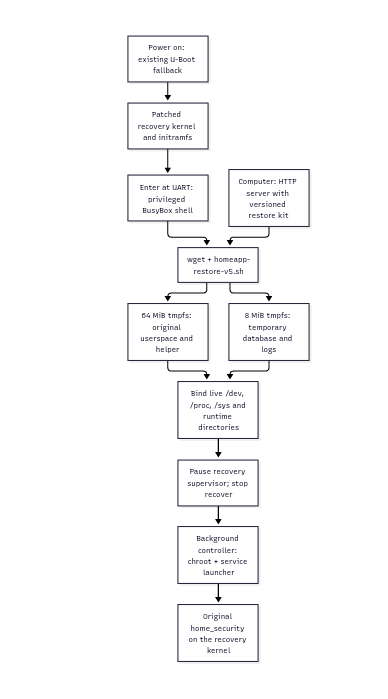
The two most important scripts to rebuild the filesystem are shown below:
#!/bin/sh
# Recovery UART bootstrap. Run with sh; do not source into the login shell.
# Usage: sh homeapp-restore-v5.sh [http://PC:8000] [--start]
PATH=/bin:/sbin:/usr/bin:/usr/sbin
export PATH
unset LD_PRELOAD LD_LIBRARY_PATH
BASE=/media/homeapp-debug
ROOT=$BASE/rootfs
SERVER=http://192.168.90.112:8000
START=no
fail() { echo "homeapp-restore: $*" >&2; exit 1; }
for argument in "$@"; do
    case "$argument" in
        http://*) SERVER=${argument%/} ;;
        --start) START=yes ;;
        *) fail 'usage: sh homeapp-restore-v5.sh [http://PC:8000] [--start]' ;;
    esac
done
case "$SERVER" in *' '*|*'?'*|*'#'*) fail 'use a plain HTTP base URL without spaces/query/fragment' ;; esac
[ "`awk '/^Uid:/ {print $3}' /proc/self/status`" = 0 ] || fail 'root effective UID required'
[ -r /proc/self/mountinfo ] || fail '/proc/self/mountinfo is required'
[ -c /dev/gpio ] && [ -c /dev/apsoc_nvram ] || fail 'expected recovery device nodes missing'

mounted() { awk -v p="$1" '$2==p {n++} END {exit n==0}' /proc/mounts; }
check_tmpfs() {
    awk -v p="$1" -v size="$2" '$2==p {
        n++; if ($3=="tmpfs") {
            count=split($4,a,","); for(i=1;i<=count;i++) if(a[i]=="size=" size "k") ok=1
        }
    } END {exit !(n==1 && ok)}' /proc/mounts
}
empty_dir() {
    [ ! -e "$1" ] && return 0
    [ -d "$1" ] && [ ! -L "$1" ] || return 1
    [ -z "`ls -A "$1"`" ]
}
asset_md5() {
    # BEGIN GENERATED ASSET HASHES
    case "$1" in
        busybox-extra) echo b587f623ef28b84e277fbd1b2b0b2348 ;;
        homeapp-enter) echo 8fde5ed1e3e65d07a7b9ebe672b25a5c ;;
        homeapp-mount-runtime.sh) echo 19e73a1584137c0d2150d6968cccb4c5 ;;
        homeapp-start-bounded-v4.sh) echo 19b70b8ac6751f8e161e490460ff8f3e ;;
        homeapp-control-v5.sh) echo 2fc7613db0f02a0d16c1417bb0282264 ;;
        homeapp_rootfs.tar.gz) echo bf6acaecf3301532bda2c1f6c41a3b2c ;;
        *) return 1 ;;
    esac
    # END GENERATED ASSET HASHES
}
verify() {
    expected=`asset_md5 "$1"` || fail "unknown asset: $1"
    actual=`md5sum "$2" | awk '{print $1}'`
    [ "$actual" = "$expected" ] || fail "checksum mismatch: $2; stop and check the PC bundle"
}
fetch() {
    asset=$1
    echo "homeapp-restore: downloading $asset"
    wget -O "$BASE/$asset.part" "$SERVER/$asset" || fail "download failed: $asset; partial setup preserved"
    verify "$asset" "$BASE/$asset.part"
    mv "$BASE/$asset.part" "$BASE/$asset" || fail "cannot finish $asset"
}
stamp() { awk '{sub(/^.*\) /, ""); print $20}' "/proc/$1/stat" 2>/dev/null; }
is_supervisor() {
    [ -r "/proc/$1/cmdline" ] || return 1
    tr '\000' '\n' < "/proc/$1/cmdline" | awk '
        NR==1 {shell=($0=="sh" || $0=="/bin/sh" || $0=="/sbin/run_mini_system.sh")}
        $0=="/sbin/run_mini_system.sh" {script=1}
        END {exit !(shell && script)}'
}
recover_pids() {
    for procdir in /proc/[0-9]*; do
        [ -e "$procdir/exe" ] || continue
        if [ "$procdir/exe" -ef /bin/recover ] || [ "$procdir/exe" -ef /sbin/recover ]; then
            echo "${procdir#/proc/}"
        fi
    done
}
signal_recover() {
    for recover_pid in `recover_pids`; do
        if [ "/proc/$recover_pid/exe" -ef /bin/recover ] || [ "/proc/$recover_pid/exe" -ef /sbin/recover ]; then
            kill "-$1" "$recover_pid" 2>/dev/null || :
        fi
    done
}
coordinate_recovery() {
    # Exact argv matching avoids accidentally signalling grep or the UART shell.
    for procdir in /proc/[0-9]*; do
        supervisor_pid=${procdir#/proc/}
        if is_supervisor "$supervisor_pid"; then
            supervisor_stamp=`stamp "$supervisor_pid"`
            [ -n "$supervisor_stamp" ] || continue
            kill -STOP "$supervisor_pid" || fail "cannot pause recovery supervisor $supervisor_pid"
            echo "$supervisor_pid $supervisor_stamp" > "$BASE/recovery-supervisor-$supervisor_pid"
            echo "homeapp-restore: paused recovery supervisor $supervisor_pid"
        fi
    done
    signal_recover TERM
    sleep 2
    signal_recover KILL
    sleep 1
    [ -z "`recover_pids`" ] || fail 'recovery tasks survived stop'
    pidof recover >/dev/null 2>&1 && fail 'unrecognized recover process remains; inspect ps'
    return 0
}
install_commands() {
    for asset in homeapp-mount-runtime.sh homeapp-start-bounded-v4.sh homeapp-control-v5.sh; do
        verify "$asset" "$BASE/$asset"
    done
    # Rename new files into place: never truncate a script a running shell
    # may still be reading during a repeated preparation command.
    for asset in homeapp-mount-runtime.sh homeapp-start-bounded-v4.sh homeapp-control-v5.sh; do
        destination=/tmp/$asset
        [ "$asset" != homeapp-control-v5.sh ] || destination=/tmp/homeapp
        cp "$BASE/$asset" "$destination.part.$$" || fail "cannot copy $asset"
        chmod 755 "$destination.part.$$" || fail "cannot mark $asset executable"
        mv "$destination.part.$$" "$destination" || fail "cannot install $asset"
    done
}

echo 'homeapp-restore revision: v5; original firmware applications, RAM staging'
if [ -f "$BASE/restore-v5.ready" ]; then
    # Reusing this recipe's completed setup is safe; never extract over binds.
    check_tmpfs "$BASE" 65536 || fail 'staging mount changed or is stacked'
    check_tmpfs /media/mmcblk0p1 8192 || fail 'database mount changed or is stacked'
    verify homeapp-enter "$BASE/homeapp-enter"
    verify busybox-extra "$BASE/busybox-extra"
    install_commands
    sh /tmp/homeapp-mount-runtime.sh --resume || fail 'runtime mount verification failed'
    coordinate_recovery
    echo 'homeapp-restore: verified and reused completed setup; no archive download/extraction'
else
    # Fail closed on partial/manual setups; no rm -rf, unmount or overlay of data.
    mounted "$BASE" && fail 'unrecognized/partial staging mount; inspect it or reboot before retrying'
    empty_dir "$BASE" || fail 'staging directory is not empty; preserve it and inspect or reboot'
    mounted /media/mmcblk0p1 && fail 'database/storage path already mounted; will not cover it'
    empty_dir /media/mmcblk0p1 || fail 'database/storage directory is not empty; will not cover it'
    free_kb=`awk '/^MemFree:/ {print $2}' /proc/meminfo`
    [ "${free_kb:-0}" -ge 81920 ] || fail 'less than 80 MiB free; reboot to a fresh recovery shell or inspect memory'
    # Refuse existing normal services before staging/coordination.
    for service in home_security mdnsd mips_collector pushMuxer systemServer embdb_eufy; do
        pidof "$service" >/dev/null 2>&1 && fail "$service already running; use a fresh recovery boot"
    done
    original_mode=`cat /proc/sys/vm/overcommit_memory`
    original_ratio=`cat /proc/sys/vm/overcommit_ratio`
    if [ "$original_mode" = 2 ] && [ "$original_ratio" -lt 75 ]; then
        echo 75 > /proc/sys/vm/overcommit_ratio || fail 'cannot raise runtime commit ratio'
        echo "homeapp-restore: strict overcommit ratio $original_ratio -> 75 (this boot only)"
    fi
    if [ "$original_mode" = 2 ]; then
        headroom=`awk '/^CommitLimit:/ {limit=$2} /^Committed_AS:/ {used=$2} END {print limit-used}' /proc/meminfo`
        [ "$headroom" -ge 65536 ] || fail 'less than 64 MiB commitment headroom; no extraction attempted'
    fi
    mkdir -p "$BASE" || fail 'cannot create staging directory'
    mount -t tmpfs -o size=64m tmpfs "$BASE" || fail 'cannot mount staging tmpfs'
    check_tmpfs "$BASE" 65536 || fail 'unexpected staging filesystem size'
    echo "$original_mode $original_ratio" > "$BASE/original-overcommit"
    echo "$SERVER" > "$BASE/download-server"
    for asset in busybox-extra homeapp-enter homeapp-mount-runtime.sh homeapp-start-bounded-v4.sh homeapp-control-v5.sh; do
        fetch "$asset"
    done
    chmod 755 "$BASE/busybox-extra" "$BASE/homeapp-enter" || fail 'chmod failed'
    "$BASE/homeapp-enter" --check || fail 'native helper does not run'
    fetch homeapp_rootfs.tar.gz
    (cd "$BASE" && ./busybox-extra tar -xzf homeapp_rootfs.tar.gz) || fail 'extraction failed; preserve diagnostics, then reboot before retrying'
    # Only the verified temporary archive is removed, before any runtime binds.
    rm "$BASE/homeapp_rootfs.tar.gz" || fail 'cannot remove staged archive'
    "$BASE/homeapp-enter" "$ROOT" /bin/sh -c ':' || fail 'normal loader/BusyBox does not execute'
    mkdir -p /media/mmcblk0p1 || fail 'cannot create database path'
    mount -t tmpfs -o size=8m tmpfs /media/mmcblk0p1 || fail 'cannot mount temporary database'
    check_tmpfs /media/mmcblk0p1 8192 || fail 'unexpected database filesystem size'
    mkdir -p /media/mmcblk0p1/.sqlite || fail 'cannot create database directory'
    install_commands
    sh /tmp/homeapp-mount-runtime.sh --apply || fail 'runtime mount setup failed; earlier mounts preserved'
    coordinate_recovery
    echo v5 > "$BASE/restore-v5.ready" || fail 'cannot record successful setup'
fi
echo 'homeapp-restore: READY. /tmp/homeapp start|status|logs|stop|shell'
echo 'Wi-Fi/I2C drivers and persistent flash configuration are not restored by userspace staging.'
df -k "$BASE" /media/mmcblk0p1
if [ "$START" = yes ]; then
    /tmp/homeapp start || fail 'setup completed, but application startup failed; inspect /tmp/homeapp status'
fi


#!/bin/sh
# Run with `sh`, never source into the interactive UART shell.
# Does not start services, mount flash, or change memory policy.
PATH=/bin:/sbin:/usr/bin:/usr/sbin
export PATH
BASE=/media/homeapp-debug
ROOT=/media/homeapp-debug/rootfs
fail() { echo "homeapp-mount: $*" >&2; exit 1; }
mounted() { awk -v p="$1" '$2 == p {found=1} END {exit !found}' /proc/mounts; }
same_mount_root() {
    # Compare device ID and filesystem-root path, not just the filesystem type.
    awk -v s="$1" -v d="$2" '
        $5 == s {source=$3 " " $4}
        $5 == d {target=$3 " " $4; count++}
        END {exit !(count == 1 && source != "" && source == target)}
    ' /proc/self/mountinfo
}

case "${1-}" in
    --inspect)
        echo '--- Mounts ---'
        cat /proc/mounts
        echo '--- Memory ---'
        cat /proc/meminfo
        echo '--- Overcommit mode / ratio ---'
        cat /proc/sys/vm/overcommit_memory /proc/sys/vm/overcommit_ratio
        echo '--- Staged executables ---'
        ls -l "$BASE/homeapp-enter" "$ROOT/bin/busybox" "$ROOT/bin/home_security"
        echo '--- Processes ---'
        ps
        exit 0
        ;;
    --apply|--resume) mode=$1 ;;
    *) fail 'usage: sh homeapp-mount-runtime.sh --inspect|--apply|--resume' ;;
esac

mounted "$BASE" || fail 'staging filesystem is not mounted'
[ -x "$BASE/homeapp-enter" ] || fail 'native helper missing'
[ -x "$ROOT/bin/home_security" ] || fail 'application missing'
mounted /media/mmcblk0p1 || fail 'prepare temporary database mount first'
[ -d /media/mmcblk0p1/.sqlite ] || fail 'database directory missing'

# Resume only matching binds, with one mount at each staged destination.
# Leave staged /mnt (including its original zx_log.conf) in place. Recovery's
# /mnt bind failed in the first attempt; persistent state is a separate step.
for path in dev proc sys etc var tmp media dev/pts media/mmcblk0p1; do
    if mounted "$ROOT/$path"; then
        [ "$mode" = --resume ] || fail "$ROOT/$path already mounted; inspect partial setup first"
        same_mount_root "/$path" "$ROOT/$path" || fail "existing bind does not match /$path, or is stacked: $ROOT/$path"
    fi
done

bind_path() {
    source_path=$1
    target_path=$2
    if mounted "$target_path"; then
        echo "homeapp-mount: keeping verified bind $target_path"
        return 0
    fi
    mkdir -p "$target_path" || fail "cannot create $target_path"
    echo "homeapp-mount: $source_path -> $target_path"
    mount -o bind "$source_path" "$target_path"
    rc=$?
    [ "$rc" -eq 0 ] || fail "mount exited $rc: $source_path -> $target_path (earlier mounts preserved)"
    mounted "$target_path" || fail "mount returned success but $target_path is absent from /proc/mounts"
    same_mount_root "$source_path" "$target_path" || fail "unexpected mount root at $target_path"
}
for path in dev proc sys etc var tmp media; do
    bind_path "/$path" "$ROOT/$path"
done
bind_path /dev/pts "$ROOT/dev/pts"
bind_path /media/mmcblk0p1 "$ROOT/media/mmcblk0p1"
echo 'Runtime binds completed; no application services started.'
Then running it from the UART shell we can see it prepares everything and also launch the binary:
# wget -O /tmp/homeapp-restore-v5.sh http://192.168.90.112:8000/homeapp-restore-
v5.sh
Connecting to 192.168.90.112:8000 (192.168.90.112:8000)
homeapp-restore-v5.s 100% |*******************************|  9174  --:--:-- ETA
# sh /tmp/homeapp-restore-v5.sh http://192.168.90.112:8000 --start
homeapp-restore revision: v5; original firmware applications, RAM staging
homeapp-restore: strict overcommit ratio 50 -> 75 (this boot only)
homeapp-restore: downloading busybox-extra
Connecting to 192.168.90.112:8000 (192.168.90.112:8000)
busybox-extra.part   100% |*******************************|   673k --:--:-- ETA
homeapp-restore: downloading homeapp-enter
Connecting to 192.168.90.112:8000 (192.168.90.112:8000)
homeapp-enter.part   100% |*******************************|   622k --:--:-- ETA
homeapp-restore: downloading homeapp-mount-runtime.sh
Connecting to 192.168.90.112:8000 (192.168.90.112:8000)
homeapp-mount-runtim 100% |*******************************|  3054  --:--:-- ETA
homeapp-restore: downloading homeapp-start-bounded-v4.sh
Connecting to 192.168.90.112:8000 (192.168.90.112:8000)
homeapp-start-bounde 100% |*******************************|  4383  --:--:-- ETA
homeapp-restore: downloading homeapp-control-v5.sh
Connecting to 192.168.90.112:8000 (192.168.90.112:8000)
homeapp-control-v5.s 100% |*******************************|  6488  --:--:-- ETA
homeapp-enter: running; uid=0 euid=0; static MIPS helper
homeapp-restore: downloading homeapp_rootfs.tar.gz
Connecting to 192.168.90.112:8000 (192.168.90.112:8000)
homeapp_rootfs.tar.g 100% |*******************************| 14579k 00:00:00 ETA
homeapp-mount: /dev -> /media/homeapp-debug/rootfs/dev
homeapp-mount: /proc -> /media/homeapp-debug/rootfs/proc
homeapp-mount: /sys -> /media/homeapp-debug/rootfs/sys
homeapp-mount: /etc -> /media/homeapp-debug/rootfs/etc
homeapp-mount: /var -> /media/homeapp-debug/rootfs/var
homeapp-mount: /tmp -> /media/homeapp-debug/rootfs/tmp
homeapp-mount: /media -> /media/homeapp-debug/rootfs/media
homeapp-mount: /dev/pts -> /media/homeapp-debug/rootfs/dev/pts
homeapp-mount: /media/mmcblk0p1 -> /media/homeapp-debug/rootfs/media/mmcblk0p1
Runtime binds completed; no application services started.
homeapp-restore: READY. /tmp/homeapp start|status|logs|stop|shell
Wi-Fi/I2C drivers and persistent flash configuration are not restored by userspace staging.
Filesystem           1k-blocks      Used Available Use% Mounted on
tmpfs                    65536     44844     20692  68% /media/homeapp-debug
tmpfs                     8192         0      8192   0% /media/mmcblk0p1
homeapp-mount: keeping verified bind /media/homeapp-debug/rootfs/dev
homeapp-mount: keeping verified bind /media/homeapp-debug/rootfs/proc
homeapp-mount: keeping verified bind /media/homeapp-debug/rootfs/sys
homeapp-mount: keeping verified bind /media/homeapp-debug/rootfs/etc
homeapp-mount: keeping verified bind /media/homeapp-debug/rootfs/var
homeapp-mount: keeping verified bind /media/homeapp-debug/rootfs/tmp
homeapp-mount: keeping verified bind /media/homeapp-debug/rootfs/media
homeapp-mount: keeping verified bind /media/homeapp-debug/rootfs/dev/pts
homeapp-mount: keeping verified bind /media/homeapp-debug/rootfs/media/mmcblk0p1
Runtime binds completed; no application services started.
homeapp: launcher PID 5880; startup output: /media/mmcblk0p1/homeapp-launch-5565.log
homeapp: startup in progress; /tmp/homeapp status and /tmp/homeapp logs
A running launcher is not proof of application or enrollment readiness.
Finally we can see that the services are exposed!
# /media/homeapp-debug/busybox-extra netstat -lntup
Active Internet connections (only servers)
Proto Recv-Q Send-Q Local Address           Foreign Address         State       PID/Program name
tcp        0      0 0.0.0.0:10400           0.0.0.0:*               LISTEN      6016/home_security
tcp        0      0 0.0.0.0:10402           0.0.0.0:*               LISTEN      6016/home_security
tcp        0      0 0.0.0.0:32290           0.0.0.0:*               LISTEN      6016/home_security
tcp        0      0 0.0.0.0:10404           0.0.0.0:*               LISTEN      6016/home_security
tcp        0      0 0.0.0.0:32292           0.0.0.0:*               LISTEN      6016/home_security
tcp        0      0 0.0.0.0:32293           0.0.0.0:*               LISTEN      6016/home_security
tcp        0      0 0.0.0.0:32295           0.0.0.0:*               LISTEN      6016/home_security
tcp        0      0 0.0.0.0:10600           0.0.0.0:*               LISTEN      6016/home_security
tcp        0      0 0.0.0.0:32392           0.0.0.0:*               LISTEN      6016/home_security
tcp        0      0 0.0.0.0:9000            0.0.0.0:*               LISTEN      5974/pushMuxer
tcp        0      0 127.0.0.1:5000          0.0.0.0:*               LISTEN      5963/mips_collector
tcp        0      0 0.0.0.0:554             0.0.0.0:*               LISTEN      5974/pushMuxer
tcp        0      0 0.0.0.0:53              0.0.0.0:*               LISTEN      1405/dnsmasq
tcp        0      0 0.0.0.0:23              0.0.0.0:*               LISTEN      1693/telnetd
netstat: /proc/net/tcp6: No such file or directory
udp        0      0 0.0.0.0:53              0.0.0.0:*                           1405/dnsmasq
udp        0      0 0.0.0.0:32380           0.0.0.0:*                           6016/home_security
udp        0      0 0.0.0.0:46217           0.0.0.0:*                           6456/ntpclient
udp        0      0 0.0.0.0:43466           0.0.0.0:*                           1405/dnsmasq
udp        0      0 0.0.0.0:21200           0.0.0.0:*                           6016/home_security
udp        0      0 0.0.0.0:29947           0.0.0.0:*                           6016/home_security
netstat: /proc/net/udp6: No such file or directory
The last thing was compiling a compatible version of GDB and upload it to the device to start playing :)
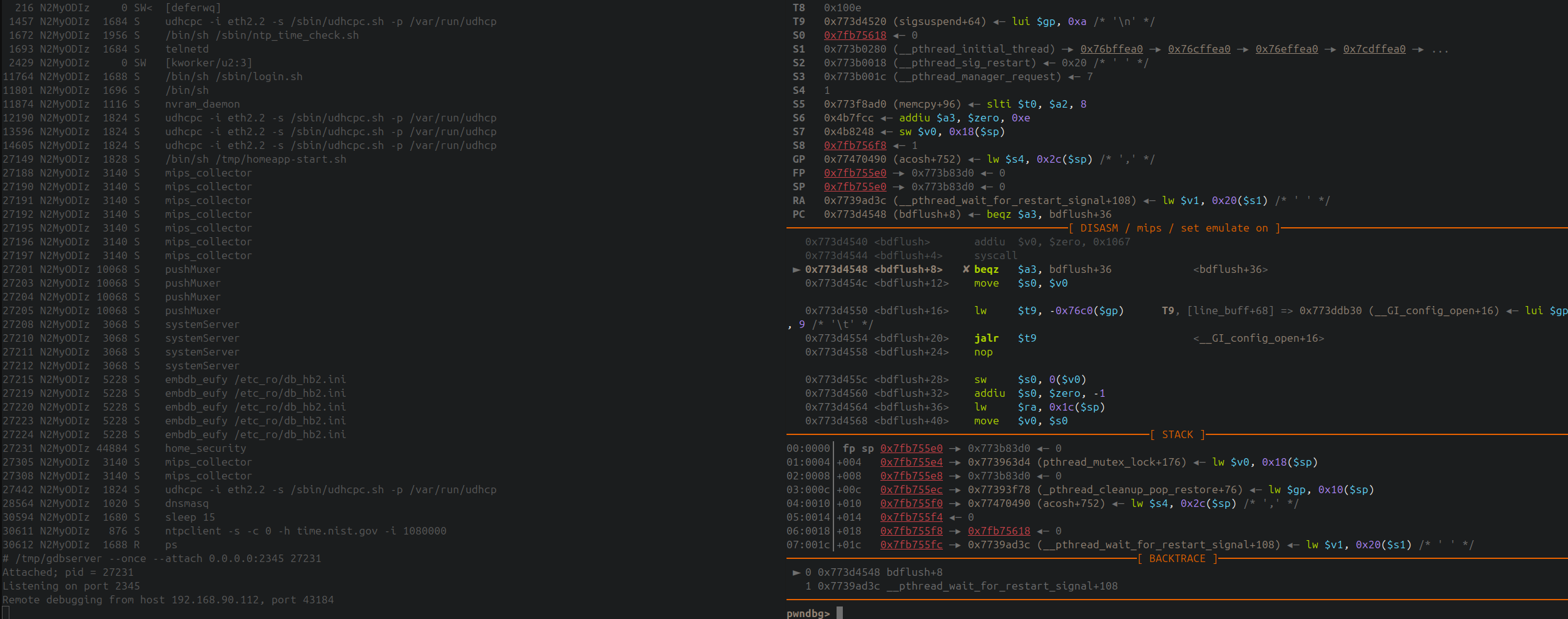
Of course far more configurations changes are needed to make the binary work properly (e.g. I had to bridge an eth interface to create a br0 within the range it needs for the peers -long story short: it uses a peer table with MAC addresses to reject or accept communications), but with a debugger everything is far more easy. Just fire the process, check what fails, correct it or just hook it to feed with the values it’s expecting to continue the flow.
0x04 Final words
With the arrival of LLMs, I’ve lost all enthusiasm for publishing technical content. I’ve been publishing articles online since 2007 sharing things I learned or discovered using dozens of different aliases across various blogs and forums. That is nearly 20 years. And today, I’ve lost all desire to share my experiences.
For one thing, there is the loss of value in writing if no one is going to read it. Nowadays, only a minority of people actually stop to read an article; most ask an AI for a summary or simply skim through without paying attention. There used to be an ecosystem where people spent time checking their RSS feeds (damn, I’m old) and reading articles from their favorite blogs or authors. The first major blow in this regard came from social media, where immediacy and “scoring Twitter points” became the primary driving force behind content creation.
Then there is the fact that the vast majority of published articles are generated directly by AI. Even interesting research pieces or vulnerability write-ups are churned out by automated looms, using that lobotomized language that gives me a stroke every time I try to read them. People seem delighted to gobble up such insubstantial crap. I suppose because it follows that first point. I write in “broken English” (yep, even though I’ve been working for a UK company for five years, my English is still terrible), yet I would a million times rather read an article written by a person in “broken English” than the umpteenth repetition of the same structures and stock phrases ChatGPT peppers its texts with.
The final nail in the coffin is the fact that… does it even make sense in 2026 to keep publishing technical content for human readers? In the past, you’d read a lot of material (or even bookmark it for future reference) because it was genuinely useful. Perhaps you were tinkering with a product’s firmware that someone else had already explored; you could find that article and follow the trail they blazed. The same applied to vulnerability analysis: you’d read about others’ work so you could replicate it when you encountered a similar scenario. And I’m not just talking about specific products; I’m talking about methodologies: how someone solved a problem, allowing you to face the same situation years later and apply what you had read back then. With AI, this no longer makes sense; the world is turning into a collection of meat proxies prompting the latest LLM to resolve whatever snag or situation arises.
I obviously use AI in my professional work, but not to tackle my “hobby” projects (like the things I post on this blog). I need to clarify that last point: I use it, for instance, when I’m reverse-engineering something and come across a function that performs mathematical operations (like when I used it in the previous article to identify Reed-Solomon), or to automate a task I’ve already performed manually (e.g., in this very article, I used it to build a script based on commands I had executed and that were recorded in the log). I thoroughly enjoy my hobby, and I don’t want automation to rob me of those hours spent banging my head against the wall trying to figure something out, or that moment of pleasure when the penny drops and I have a “eureka” moment.
About a decade ago I remember reading Matasano’s cryptochallenges and this sentence stuck in my head since then: Breaking repeating-key XOR (“Vigenere”) statistically is obviously an academic exercise, a “Crypto 101” thing. But more people “know how” to break it than can actually break it.
I guess now we live in the world where everyone knows how to ask the LLM to hack something instead of actual knowing how to hack something.
As usual, feel free to give us feedback at our twitter @AdeptsOf0xCC (although I lost the password and can’t access to the account anymore :D).